Showing posts with label Inventor 2018. Show all posts

Thursday, August 19, 2021

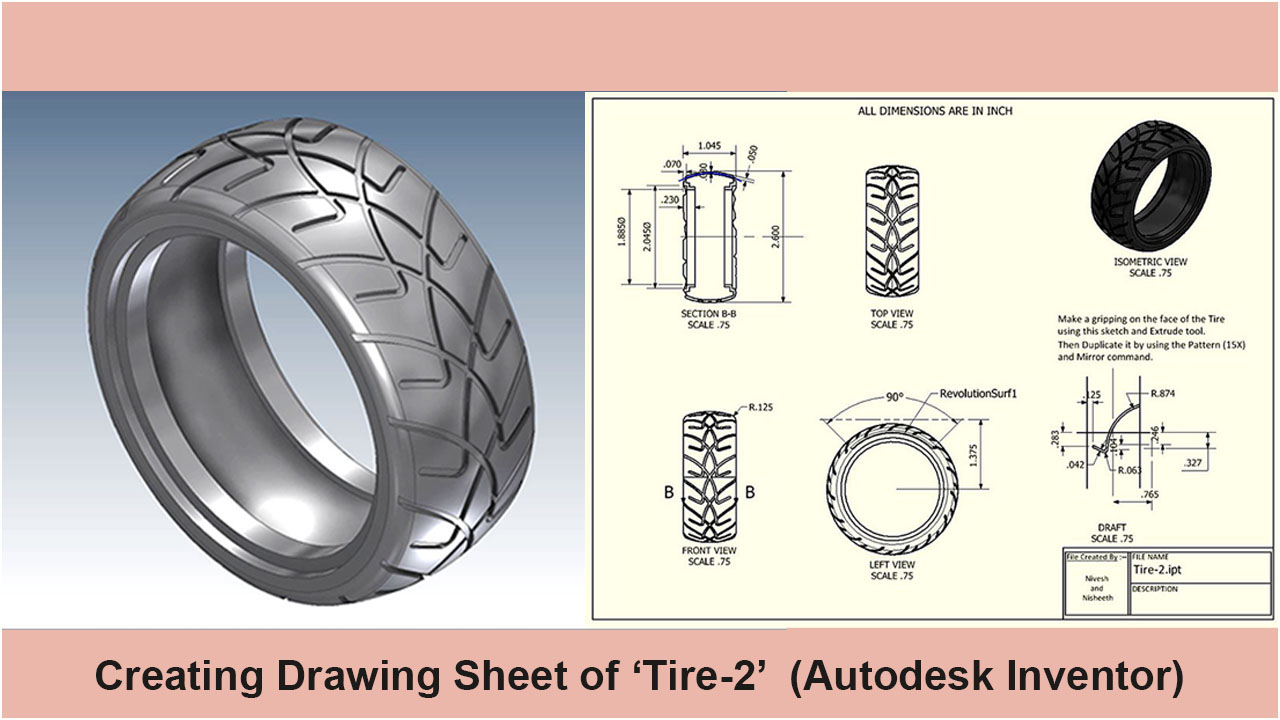
Drawing Sheet Tutorial (Tire-2) (Autodesk Inventor 2018)

Serial No. 323.

Drawing Sheet Tutorial (Tire-2) (Autodesk Inventor 2018

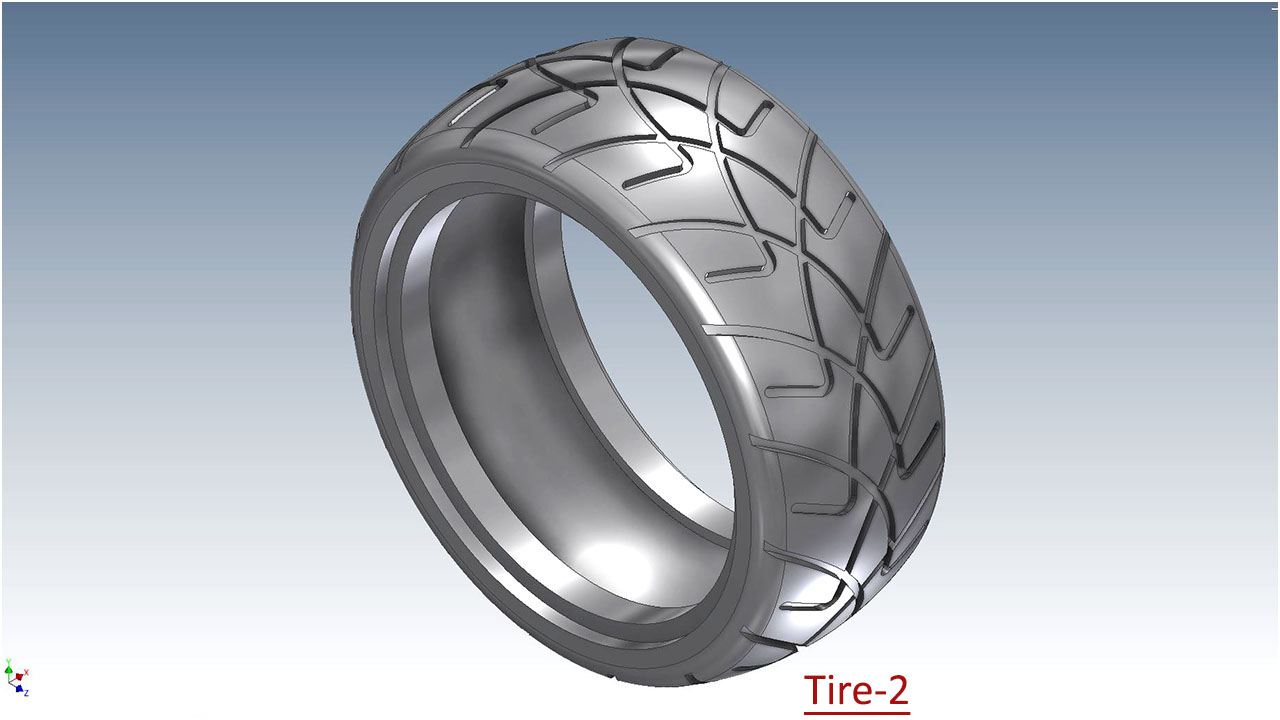
Hello Viewers, In this video, we will show how to generate a Drawing Sheet of our model 'Tire-2' in Autodesk Inventor 2018, which is taken from our 'Suspension Assembly'. ..............................................................................................

Introduction of the Drawing Sheet this tutorial provides step-by-step instructions for creating a 2D drawing sheet from a 3D model. Create this drawing sheet will help to learn techniques such as:

Chapters:- 00:10 Introduction of the 'Tire-2' Drawing Sheet. 01:34 Activate and place the 'Base View'.

02:00 Place 'Projected Views' of the model in a new Drawing Sheet. 02:48 Set the Base/Projected views name & scale and activate the Toggle visibility button.

04:040 A detailed discussion about the Drawing Views and their Projected Views by editing these views.

06:03 A Detailed information about these options like 'Include Surface Bodies' / 'Include Mesh Bodies' how to role in the drawing sheet. 07:51 Break & realign the drawing views by using the Break/Vertical alignment tools.

10:20 Placing a 'Section View' of the model in the Drawing Sheet.

12:25 Creating dimensions over the Drawing Views.

19:12 Activate the Include Surface Bodies and Include Mesh Bodies option.

21:00 How to display the work-plane in drawing by using the 'Include' option.

22:51 Using Draft View in the Drawing.

26:07 Using Center Mark tool.

26:45 Using the Centerline Bisector tool.)


Click the following link to get the model file: - https://bit.ly/3iXlvkL


....................................................................................................
Visit the following link to watch the basic tutorial on Autodesk Inventor by us
https://www.youtube.com/playlist?list=PLb-IhKRMYSERYpB48aY-sZ10fN6CfXIL4
.........................................................................
To watch detailed tutorials on the same software visit the following link
https://www.youtube.com/playlist?list=PL74BDF7431ED13443
..........................................................................................
Hope all of you enjoyed the tutorial. If you find the video useful please like it and share it with your friends/colleagues and do not forget to subscribe us to get latest updates about our new uploads.
http://www.youtube.com/user/niveshandnisheeth?sub_confirmation=1
....................................................................................................
Dear Viewers if you like our work and wanted to support us, to keep continuing the good work, then become a patron of ours at ‘Patreon’ site. Patreon is a simple way for you to contribute to the creator’s work every month/ every time they release their new work and get rewards in return. Please visit the following link to know all about our work and what we are offering as the reward to our patrons…
https://www.patreon.com/nisheethsri+

Wednesday, May 22, 2019

Generation of Conic Section → Ellipse (Autodesk Inventor 2018 Tutorial)

Serial No. 306

Generation of Conic Section → Ellipse (Autodesk Inventor 2018 Tutorial)

In mathematics, a conic section (or simply conic) is a curve obtained as the intersection of the surface of a cone with a plane. The three types of conic section are the hyperbola, the parabola, and the ellipse; the circle is a special case of the ellipse, though historically it was sometimes called a fourth type.
At the end of this video, we will show how to rotate a sketch of the ellipse to create an Ellipsoid by using the Revolve tool.

Video:--


Click the following link to get the model file: - http://bit.ly/2nmoM3i


Note:-

The finished file related to this tutorial is available to download as mentioned above. But for this send us a formal request on our following email niveshandnisheeth@gmail.com to download it.
...................................................................................
Our motive to upload this video is to show our workability/experience and to share my knowledge with the viewers and learners.

....................................................................................................
Visit the following link to watch the basic tutorial on Autodesk Inventor by us
https://www.youtube.com/playlist?list=PLb-IhKRMYSERYpB48aY-sZ10fN6CfXIL4
.........................................................................
To watch detailed tutorials on the same software visit the following link
https://www.youtube.com/playlist?list=PL74BDF7431ED13443
..........................................................................................
Hope all of you enjoyed the tutorial. If you find the video useful please like it and share it with your friends/colleagues and do not forget to subscribe us to get latest updates about our new uploads.
http://www.youtube.com/user/niveshandnisheeth?sub_confirmation=1
....................................................................................................
Dear Viewers if you like our work and wanted to support us, to keep continuing the good work, then become a patron of ours at ‘Patreon’ site. Patreon is a simple way for you to contribute to the creator’s work every month/ every time they release their new work and get rewards in return. Please visit the following link to know all about our work and what we are offering as the reward to our patrons…
https://www.patreon.com/nisheethsri

Generation of Conic Section → Parabola (Autodesk Inventor 2018 Tutorial)

Serial No. 307

Generation of Conic Section → Parabola (Autodesk Inventor 2018 Tutorial)

In mathematics, a conic section (or simply conic) is a curve obtained as the intersection of the surface of a cone with a plane. The three types of conic section are the hyperbola, the parabola, and the ellipse; the circle is a special case of the ellipse, though historically it was sometimes called a fourth type.
At the end of this video, we will show how to rotate a sketch of the parabola to create a Paraboloid by using the Revolve tool.

Video:--


Click the following link to get the model file: - http://bit.ly/2nzmZro


Note:-

The finished file related to this tutorial is available to download as mentioned above. But for this send us a formal request on our following email niveshandnisheeth@gmail.com to download it.
...................................................................................
Our motive to upload this video is to show our workability/experience and to share my knowledge with the viewers and learners.

....................................................................................................
Visit the following link to watch the basic tutorial on Autodesk Inventor by us
https://www.youtube.com/playlist?list=PLb-IhKRMYSERYpB48aY-sZ10fN6CfXIL4
.........................................................................
To watch detailed tutorials on the same software visit the following link
https://www.youtube.com/playlist?list=PL74BDF7431ED13443
..........................................................................................
Hope all of you enjoyed the tutorial. If you find the video useful please like it and share it with your friends/colleagues and do not forget to subscribe us to get latest updates about our new uploads.
http://www.youtube.com/user/niveshandnisheeth?sub_confirmation=1
....................................................................................................
Dear Viewers if you like our work and wanted to support us, to keep continuing the good work, then become a patron of ours at ‘Patreon’ site. Patreon is a simple way for you to contribute to the creator’s work every month/ every time they release their new work and get rewards in return. Please visit the following link to know all about our work and what we are offering as the reward to our patrons…
https://www.patreon.com/nisheethsri

Generation of Conic Section → Hyperbola (Autodesk Inventor 2018 Tutorial)


Serial No. 308

Generation of Conic Section → Hyperbola (Autodesk Inventor 2018 Tutorial)

In mathematics, a conic section (or simply conic) is a curve obtained as the intersection of the surface of a cone with a plane. The three types of conic section are the hyperbola, the parabola, and the ellipse; the circle is a special case of the ellipse, though historically it was sometimes called a fourth type.
At the end of this video, we will show how to rotate a sketch of the Hyperbola to create a hyperboloid by using the Revolve tool.

Video:--


Click the following link to get the model file: - http://bit.ly/2nwxCvg


Note:-

The finished file related to this tutorial is available to download as mentioned above. But for this send us a formal request on our following email niveshandnisheeth@gmail.com to download it.
...................................................................................
Our motive to upload this video is to show our workability/experience and to share my knowledge with the viewers and learners.

....................................................................................................
Visit the following link to watch the basic tutorial on Autodesk Inventor by us
https://www.youtube.com/playlist?list=PLb-IhKRMYSERYpB48aY-sZ10fN6CfXIL4
.........................................................................
To watch detailed tutorials on the same software visit the following link
https://www.youtube.com/playlist?list=PL74BDF7431ED13443
..........................................................................................
Hope all of you enjoyed the tutorial. If you find the video useful please like it and share it with your friends/colleagues and do not forget to subscribe us to get latest updates about our new uploads.
http://www.youtube.com/user/niveshandnisheeth?sub_confirmation=1
....................................................................................................
Dear Viewers if you like our work and wanted to support us, to keep continuing the good work, then become a patron of ours at ‘Patreon’ site. Patreon is a simple way for you to contribute to the creator’s work every month/ every time they release their new work and get rewards in return. Please visit the following link to know all about our work and what we are offering as the reward to our patrons…
https://www.patreon.com/nisheethsri