Showing posts with label Inventor tutorial. Show all posts

Tuesday, March 21, 2023

Engine Block (Autodesk Inventor 2018 Tutorial)

Engine Block_1

Engine Block_2


Serial No. 342.

Engine Block (Autodesk Inventor 2018 Tutorial)

Dear Viewers, Today we will design the 'Engine Block' in Autodesk Inventor 2018 version. This tutorial will covers the following topics:'

1. Basics 2-D sketching tools like Line, Arc, Circle, rectangle and points over the different Workplanes.

2. Different kinds of Extrude command operations like Join, Cut, Distance, Between & through all option.

3. Apply the Fillet/Chamfer tool over the Solid part.

4. Simple/Complex 2d Sketching over the face of the solid part during this video.

Hope you will like this tutorial. Don’t forget like & subscribe to our YouTube Channel to get more projects and more videos in Inventor, SolidWorks and Siemens NX software.


Click the following link to get the model file: - https://bit.ly/3ySvhvw


....................................................................................................
Visit the following link to watch the basic tutorial on Autodesk Inventor by us
https://www.youtube.com/playlist?list=PLb-IhKRMYSERYpB48aY-sZ10fN6CfXIL4
.........................................................................
To watch detailed tutorials on the same software visit the following link
https://www.youtube.com/playlist?list=PL74BDF7431ED13443
..........................................................................................
Hope all of you enjoyed the tutorial. If you find the video useful please like it and share it with your friends/colleagues and do not forget to subscribe us to get latest updates about our new uploads.
http://www.youtube.com/user/niveshandnisheeth?sub_confirmation=1
....................................................................................................
Dear Viewers if you like our work and wanted to support us, to keep continuing the good work, then become a patron of ours at ‘Patreon’ site. Patreon is a simple way for you to contribute to the creator’s work every month/ every time they release their new work and get rewards in return. Please visit the following link to know all about our work and what we are offering as the reward to our patrons…
https://www.patreon.com/nisheethsri+

Sunday, March 5, 2023

Folding Cot using Rectangular bar—Volume-1 (Autodesk Inventor 2018 Tutorial)


2


1


Serial No. 340-A.


Click the following link to get the model file: - https://bit.ly/3ZIU8xi


....................................................................................................
Visit the following link to watch the basic tutorial on Autodesk Inventor by us
https://www.youtube.com/playlist?list=PLb-IhKRMYSERYpB48aY-sZ10fN6CfXIL4
.........................................................................
To watch detailed tutorials on the same software visit the following link
https://www.youtube.com/playlist?list=PL74BDF7431ED13443
..........................................................................................
Hope all of you enjoyed the tutorial. If you find the video useful please like it and share it with your friends/colleagues and do not forget to subscribe us to get latest updates about our new uploads.
http://www.youtube.com/user/niveshandnisheeth?sub_confirmation=1
....................................................................................................
Dear Viewers if you like our work and wanted to support us, to keep continuing the good work, then become a patron of ours at ‘Patreon’ site. Patreon is a simple way for you to contribute to the creator’s work every month/ every time they release their new work and get rewards in return. Please visit the following link to know all about our work and what we are offering as the reward to our patrons…
https://www.patreon.com/nisheethsri+
Folding Cot using Rectangular bar—Volume-2 (Autodesk Inventor 2018 Tutorial)


2


1


Serial No. 340-B.


Click the following link to get the model file: - https://bit.ly/3ZIU8xi


....................................................................................................
Visit the following link to watch the basic tutorial on Autodesk Inventor by us
https://www.youtube.com/playlist?list=PLb-IhKRMYSERYpB48aY-sZ10fN6CfXIL4
.........................................................................
To watch detailed tutorials on the same software visit the following link
https://www.youtube.com/playlist?list=PL74BDF7431ED13443
..........................................................................................
Hope all of you enjoyed the tutorial. If you find the video useful please like it and share it with your friends/colleagues and do not forget to subscribe us to get latest updates about our new uploads.
http://www.youtube.com/user/niveshandnisheeth?sub_confirmation=1
....................................................................................................
Dear Viewers if you like our work and wanted to support us, to keep continuing the good work, then become a patron of ours at ‘Patreon’ site. Patreon is a simple way for you to contribute to the creator’s work every month/ every time they release their new work and get rewards in return. Please visit the following link to know all about our work and what we are offering as the reward to our patrons…
https://www.patreon.com/nisheethsri+

Thursday, August 19, 2021

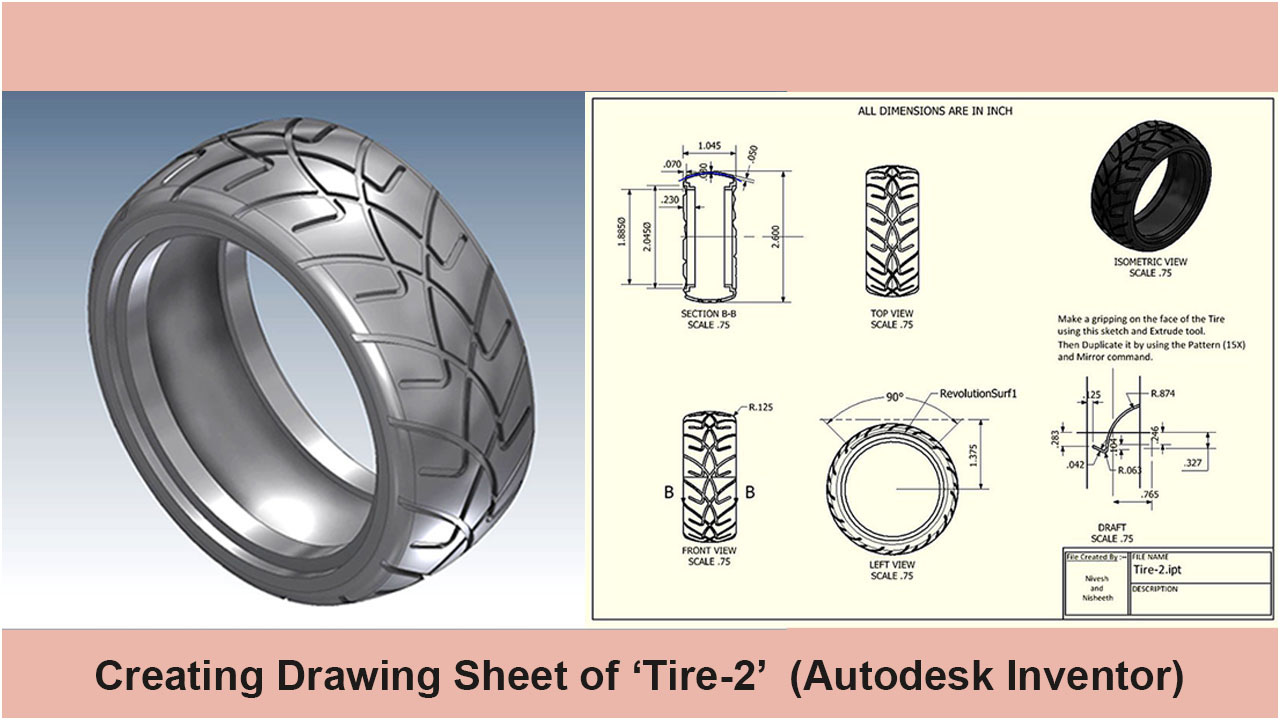
Drawing Sheet Tutorial (Tire-2) (Autodesk Inventor 2018)

Serial No. 323.

Drawing Sheet Tutorial (Tire-2) (Autodesk Inventor 2018

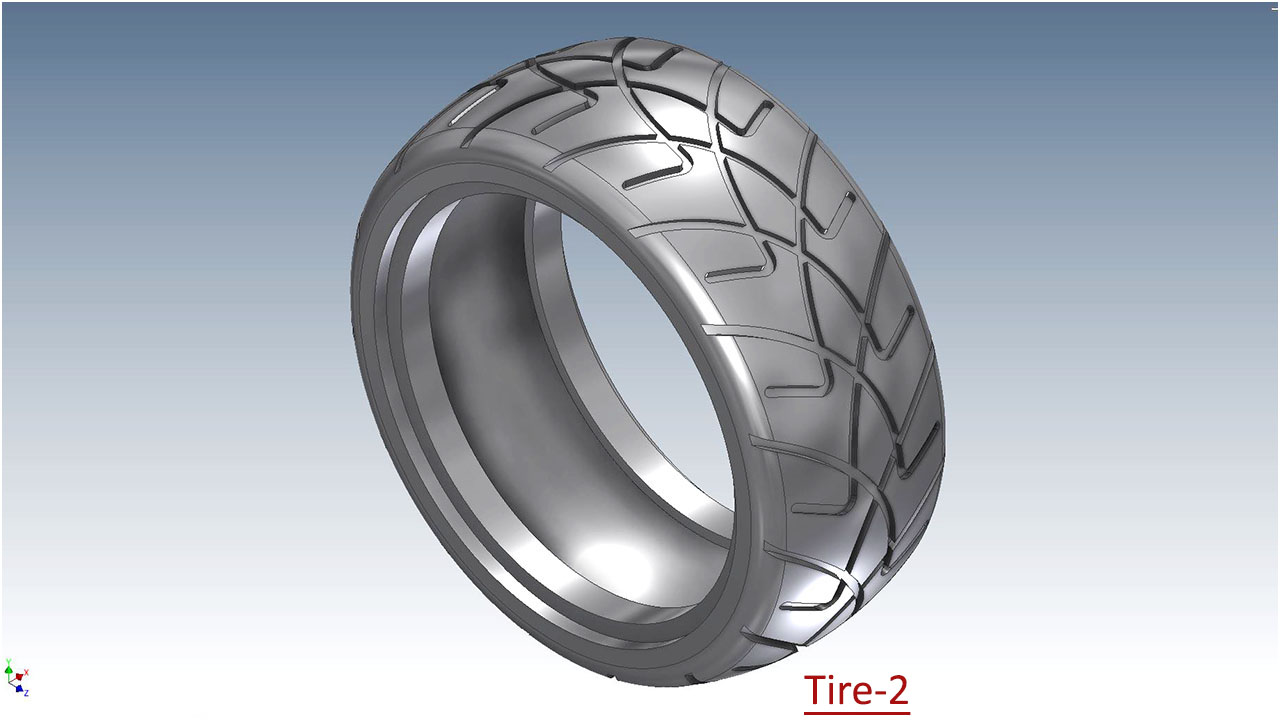
Hello Viewers, In this video, we will show how to generate a Drawing Sheet of our model 'Tire-2' in Autodesk Inventor 2018, which is taken from our 'Suspension Assembly'. ..............................................................................................

Introduction of the Drawing Sheet this tutorial provides step-by-step instructions for creating a 2D drawing sheet from a 3D model. Create this drawing sheet will help to learn techniques such as:

Chapters:- 00:10 Introduction of the 'Tire-2' Drawing Sheet. 01:34 Activate and place the 'Base View'.

02:00 Place 'Projected Views' of the model in a new Drawing Sheet. 02:48 Set the Base/Projected views name & scale and activate the Toggle visibility button.

04:040 A detailed discussion about the Drawing Views and their Projected Views by editing these views.

06:03 A Detailed information about these options like 'Include Surface Bodies' / 'Include Mesh Bodies' how to role in the drawing sheet. 07:51 Break & realign the drawing views by using the Break/Vertical alignment tools.

10:20 Placing a 'Section View' of the model in the Drawing Sheet.

12:25 Creating dimensions over the Drawing Views.

19:12 Activate the Include Surface Bodies and Include Mesh Bodies option.

21:00 How to display the work-plane in drawing by using the 'Include' option.

22:51 Using Draft View in the Drawing.

26:07 Using Center Mark tool.

26:45 Using the Centerline Bisector tool.)


Click the following link to get the model file: - https://bit.ly/3iXlvkL


....................................................................................................
Visit the following link to watch the basic tutorial on Autodesk Inventor by us
https://www.youtube.com/playlist?list=PLb-IhKRMYSERYpB48aY-sZ10fN6CfXIL4
.........................................................................
To watch detailed tutorials on the same software visit the following link
https://www.youtube.com/playlist?list=PL74BDF7431ED13443
..........................................................................................
Hope all of you enjoyed the tutorial. If you find the video useful please like it and share it with your friends/colleagues and do not forget to subscribe us to get latest updates about our new uploads.
http://www.youtube.com/user/niveshandnisheeth?sub_confirmation=1
....................................................................................................
Dear Viewers if you like our work and wanted to support us, to keep continuing the good work, then become a patron of ours at ‘Patreon’ site. Patreon is a simple way for you to contribute to the creator’s work every month/ every time they release their new work and get rewards in return. Please visit the following link to know all about our work and what we are offering as the reward to our patrons…
https://www.patreon.com/nisheethsri+
Saturday, April 25, 2020

Shaving Razor Blade || Autodesk Inventor Tutorial

In this Inventor Tutorial, we will create a model of a double-sided shaving razor blade. While creating this model we will observe as well as learn various part modelling techniques of Autodesk Inventor software. It will give the viewers a good opportunity to practice 2D sketching and sketch constraints.
....................................................................................
The model designing concept is taken from videos available on YouTube.
....................................................................................


Visit the following link to get the model file…

https://bit.ly/2S0EsVH


..................................................

Visit the following link to watch the basic tutorial on Autodesk Inventor by us

https://www.youtube.com/playlist?list=PLb-IhKRMYSERYpB48aY-sZ10fN6CfXIL4

.........................................................................

To watch detailed tutorials on the same software visit the following link

https://www.youtube.com/playlist?list=PL74BDF7431ED13443

..........................................................................................

Hope all of you enjoyed the tutorial. If you find the video useful please like it and share it with your friends/colleagues and do not forget to subscribe us to get latest updates about our new uploads.

http://www.youtube.com/user/nisheethsorjm?sub_confirmation=1

....................................................................................................

Dear Viewers if you like our work and wanted to support us, to keep continuing the good work, then become a patron of ours at ‘Patreon’ site. Patreon is a simple way for you to contribute to the creator’s work every month/ every time they release their new work and get rewards in return. Please visit the following link to know all about our work and what we are offering as the reward to our patrons…

https://www.patreon.com/nisheethsri

Sunday, February 16, 2020

Engine Crankshaft and Camshaft Bushing || Autodesk Inventor Tutorial

In this Inventor Tutorial, we will create the models of Engine Crankshaft and Camshaft Bushing. While creating this model we will observe as well as learn various part modelling techniques of Autodesk Inventor software.

....................................................................................
The model designing concept is taken from videos available on YouTube.
....................................................................................


Visit the following link to get the model file…

http://bit.ly/31TBFBq


..................................................

Visit the following link to watch the basic tutorial on Autodesk Inventor by us

https://www.youtube.com/playlist?list=PLb-IhKRMYSERYpB48aY-sZ10fN6CfXIL4

.........................................................................

To watch detailed tutorials on the same software visit the following link

https://www.youtube.com/playlist?list=PL74BDF7431ED13443

..........................................................................................

Hope all of you enjoyed the tutorial. If you find the video useful please like it and share it with your friends/colleagues and do not forget to subscribe us to get latest updates about our new uploads.

http://www.youtube.com/user/nisheethsorjm?sub_confirmation=1

....................................................................................................

Dear Viewers if you like our work and wanted to support us, to keep continuing the good work, then become a patron of ours at ‘Patreon’ site. Patreon is a simple way for you to contribute to the creator’s work every month/ every time they release their new work and get rewards in return. Please visit the following link to know all about our work and what we are offering as the reward to our patrons…

https://www.patreon.com/nisheethsri

Monday, February 3, 2020

Engine Camshaft Retainer || Autodesk Inventor Tutorial

In this Inventor Tutorial, we will create a model of Engine Camshaft Retainer. While creating this model we will observe as well as learn various part modelling techniques of Autodesk Inventor software.

....................................................................................
The model designing concept is taken from videos available on YouTube.
....................................................................................


Visit the following link to get the model file…

http://bit.ly/2RSe3Kk


..................................................

Visit the following link to watch the basic tutorial on Autodesk Inventor by us

https://www.youtube.com/playlist?list=PLb-IhKRMYSERYpB48aY-sZ10fN6CfXIL4

.........................................................................

To watch detailed tutorials on the same software visit the following link

https://www.youtube.com/playlist?list=PL74BDF7431ED13443

..........................................................................................

Hope all of you enjoyed the tutorial. If you find the video useful please like it and share it with your friends/colleagues and do not forget to subscribe us to get latest updates about our new uploads.

http://www.youtube.com/user/nisheethsorjm?sub_confirmation=1

....................................................................................................

Dear Viewers if you like our work and wanted to support us, to keep continuing the good work, then become a patron of ours at ‘Patreon’ site. Patreon is a simple way for you to contribute to the creator’s work every month/ every time they release their new work and get rewards in return. Please visit the following link to know all about our work and what we are offering as the reward to our patrons…

https://www.patreon.com/nisheethsri

Sunday, January 19, 2020

Engine Valve Cover || Autodesk Inventor Tutorial

In this Inventor Tutorial, we will create a model of Engine Valve Cover. While creating this model we will observe as well as learn various part modelling techniques of Autodesk Inventor software.

....................................................................................
The model designing concept is taken from videos available on YouTube.
....................................................................................


Visit the following link to get the model file…

http://bit.ly/2R5kQ2S


..................................................

Visit the following link to watch the basic tutorial on Autodesk Inventor by us

https://www.youtube.com/playlist?list=PLb-IhKRMYSERYpB48aY-sZ10fN6CfXIL4

.........................................................................

To watch detailed tutorials on the same software visit the following link

https://www.youtube.com/playlist?list=PL74BDF7431ED13443

..........................................................................................

Hope all of you enjoyed the tutorial. If you find the video useful please like it and share it with your friends/colleagues and do not forget to subscribe us to get latest updates about our new uploads.

http://www.youtube.com/user/nisheethsorjm?sub_confirmation=1

....................................................................................................

Dear Viewers if you like our work and wanted to support us, to keep continuing the good work, then become a patron of ours at ‘Patreon’ site. Patreon is a simple way for you to contribute to the creator’s work every month/ every time they release their new work and get rewards in return. Please visit the following link to know all about our work and what we are offering as the reward to our patrons…

https://www.patreon.com/nisheethsri

Tuesday, December 31, 2019

Engine Oil Pan || Autodesk Inventor Tutorial

In this Inventor Tutorial, we will create a model of Engine Oil Pan. While creating this model we will observe as well as learn various part modelling techniques of Autodesk Inventor software.

....................................................................................
The model designing concept is taken from videos available on YouTube.
....................................................................................


Visit the following link to get the model file…

http://bit.ly/2MHC9V2


..................................................

Visit the following link to watch the basic tutorial on Autodesk Inventor by us

https://www.youtube.com/playlist?list=PLb-IhKRMYSERYpB48aY-sZ10fN6CfXIL4

.........................................................................

To watch detailed tutorials on the same software visit the following link

https://www.youtube.com/playlist?list=PL74BDF7431ED13443

..........................................................................................

Hope all of you enjoyed the tutorial. If you find the video useful please like it and share it with your friends/colleagues and do not forget to subscribe us to get latest updates about our new uploads.

http://www.youtube.com/user/nisheethsorjm?sub_confirmation=1

....................................................................................................

Dear Viewers if you like our work and wanted to support us, to keep continuing the good work, then become a patron of ours at ‘Patreon’ site. Patreon is a simple way for you to contribute to the creator’s work every month/ every time they release their new work and get rewards in return. Please visit the following link to know all about our work and what we are offering as the reward to our patrons…

https://www.patreon.com/nisheethsri

Saturday, December 28, 2019

Oil Lamp Stand (Autodesk Inventor 2018 Tutorial)

Serial No. 315.

Oil Lamp Stand (Autodesk Inventor 2018 Tutorial)

....................................................................................................

Inside this video, you can see the full detailed process of making 3-D Parametric CAD Model through Autodesk Inventor Software.


Click the following link to get the model file: - http://bit.ly/398QSlg


....................................................................................................
Visit the following link to watch the basic tutorial on Autodesk Inventor by us
https://www.youtube.com/playlist?list=PLb-IhKRMYSERYpB48aY-sZ10fN6CfXIL4
.........................................................................
To watch detailed tutorials on the same software visit the following link
https://www.youtube.com/playlist?list=PL74BDF7431ED13443
..........................................................................................
Hope all of you enjoyed the tutorial. If you find the video useful please like it and share it with your friends/colleagues and do not forget to subscribe us to get latest updates about our new uploads.
http://www.youtube.com/user/niveshandnisheeth?sub_confirmation=1
....................................................................................................
Dear Viewers if you like our work and wanted to support us, to keep continuing the good work, then become a patron of ours at ‘Patreon’ site. Patreon is a simple way for you to contribute to the creator’s work every month/ every time they release their new work and get rewards in return. Please visit the following link to know all about our work and what we are offering as the reward to our patrons…
https://www.patreon.com/nisheethsri+

Saturday, December 14, 2019

Pincer for gripping Round Flange Pot (Autodesk Inventor 2018 Tutorial)

Serial No. 314.

Pincer for gripping Round Flange Pot (Autodesk Inventor 2018 Tutorial)

....................................................................................................

Inside this video, you can see the full detailed process of making 3-D Parametric CAD Model through Autodesk Inventor Software.


Click the following link to get the model file: - http://bit.ly/2LUJArq


....................................................................................................
Visit the following link to watch the basic tutorial on Autodesk Inventor by us
https://www.youtube.com/playlist?list=PLb-IhKRMYSERYpB48aY-sZ10fN6CfXIL4
.........................................................................
To watch detailed tutorials on the same software visit the following link
https://www.youtube.com/playlist?list=PL74BDF7431ED13443
..........................................................................................
Hope all of you enjoyed the tutorial. If you find the video useful please like it and share it with your friends/colleagues and do not forget to subscribe us to get latest updates about our new uploads.
http://www.youtube.com/user/niveshandnisheeth?sub_confirmation=1
....................................................................................................
Dear Viewers if you like our work and wanted to support us, to keep continuing the good work, then become a patron of ours at ‘Patreon’ site. Patreon is a simple way for you to contribute to the creator’s work every month/ every time they release their new work and get rewards in return. Please visit the following link to know all about our work and what we are offering as the reward to our patrons…
https://www.patreon.com/nisheethsri+

Monday, December 9, 2019

Top Tool-tray (Autodesk Inventor 2018 Tutorial)

Serial No. 313.

Top Tool-tray (Autodesk Inventor 2018 Tutorial)

It is an integral part of my model 'Ladder-foldable' which has been created in my previous video.

....................................................................................................

Inside this video, you can see the full detailed process of making 3-D Parametric CAD Model through Autodesk Inventor Software.


Click the following link to get the model file: - http://bit.ly/2Lzj9aJ


....................................................................................................
Visit the following link to watch the basic tutorial on Autodesk Inventor by us
https://www.youtube.com/playlist?list=PLb-IhKRMYSERYpB48aY-sZ10fN6CfXIL4
.........................................................................
To watch detailed tutorials on the same software visit the following link
https://www.youtube.com/playlist?list=PL74BDF7431ED13443
..........................................................................................
Hope all of you enjoyed the tutorial. If you find the video useful please like it and share it with your friends/colleagues and do not forget to subscribe us to get latest updates about our new uploads.
http://www.youtube.com/user/niveshandnisheeth?sub_confirmation=1
....................................................................................................
Dear Viewers if you like our work and wanted to support us, to keep continuing the good work, then become a patron of ours at ‘Patreon’ site. Patreon is a simple way for you to contribute to the creator’s work every month/ every time they release their new work and get rewards in return. Please visit the following link to know all about our work and what we are offering as the reward to our patrons…
https://www.patreon.com/nisheethsri+

Thursday, December 5, 2019

Engine Side Cover || Autodesk Inventor Tutorial

In this Inventor Tutorial, we will create a model of Engine Side Cover. While creating this model we will observe as well as learn various part modeling techniques of Autodesk Inventor software.

....................................................................................
The model designing concept is taken from videos available on YouTube.
....................................................................................


Visit the following link to get the model file…

http://bit.ly/34SGWtI


..................................................

Visit the following link to watch the basic tutorial on Autodesk Inventor by us

https://www.youtube.com/playlist?list=PLb-IhKRMYSERYpB48aY-sZ10fN6CfXIL4
.........................................................................

To watch detailed tutorials on the same software visit the following link

https://www.youtube.com/playlist?list=PL74BDF7431ED13443

..........................................................................................

Hope all of you enjoyed the tutorial. If you find the video useful please like it and share it with your friends/colleagues and do not forget to subscribe us to get latest updates about our new uploads.

http://www.youtube.com/user/nisheethsorjm?sub_confirmation=1

....................................................................................................

Dear Viewers if you like our work and wanted to support us, to keep continuing the good work, then become a patron of ours at ‘Patreon’ site. Patreon is a simple way for you to contribute to the creator’s work every month/ every time they release their new work and get rewards in return. Please visit the following link to know all about our work and what we are offering as the reward to our patrons…

https://www.patreon.com/nisheethsri

Wednesday, December 4, 2019

Basket-Wire Knitted (Volume-1) Autodesk Inventor 2018 Tutorial


Serial No. 312-A.

Basket-Wire Knitted (Volume-1) Autodesk Inventor Tutorial
(Rest of the design of the model is completed in Volume-2) 
...................................................................................................
In this video, we have created a Stainless Steel Basket with the stand which is used for containing a vegetable, fruits and other domestic items. Inside this video, you can see the full detailed process of making 3-D Parametric CAD Model through Autodesk Inventor Software.


Click the following link to get the model file: - http://bit.ly/33MB2sE


....................................................................................................
Visit the following link to watch the basic tutorial on Autodesk Inventor by us
https://www.youtube.com/playlist?list=PLb-IhKRMYSERYpB48aY-sZ10fN6CfXIL4
.........................................................................
To watch detailed tutorials on the same software visit the following link
https://www.youtube.com/playlist?list=PL74BDF7431ED13443
..........................................................................................
Hope all of you enjoyed the tutorial. If you find the video useful please like it and share it with your friends/colleagues and do not forget to subscribe us to get latest updates about our new uploads.
http://www.youtube.com/user/niveshandnisheeth?sub_confirmation=1
....................................................................................................
Dear Viewers if you like our work and wanted to support us, to keep continuing the good work, then become a patron of ours at ‘Patreon’ site. Patreon is a simple way for you to contribute to the creator’s work every month/ every time they release their new work and get rewards in return. Please visit the following link to know all about our work and what we are offering as the reward to our patrons…
https://www.patreon.com/nisheethsri+

Basket-Wire Knitted (Volume-2) Autodesk Inventor 2018 Tutorial


Serial No. 312-B.

Basket-Wire Knitted (Volume-2) Autodesk Inventor Tutorial
(Starting design of the model is created in Volume-1)
...................................................................................................
In this video, we have created a Stainless Steel Basket with the stand which is used for containing a vegetable, fruits and other domestic items. Inside this video, you can see the full detailed process of making 3-D Parametric CAD Model through Autodesk Inventor Software.


Click the following link to get the model file: - http://bit.ly/33MB2sE


....................................................................................................
Visit the following link to watch the basic tutorial on Autodesk Inventor by us
https://www.youtube.com/playlist?list=PLb-IhKRMYSERYpB48aY-sZ10fN6CfXIL4
.........................................................................
To watch detailed tutorials on the same software visit the following link
https://www.youtube.com/playlist?list=PL74BDF7431ED13443
..........................................................................................
Hope all of you enjoyed the tutorial. If you find the video useful please like it and share it with your friends/colleagues and do not forget to subscribe us to get latest updates about our new uploads.
http://www.youtube.com/user/niveshandnisheeth?sub_confirmation=1
....................................................................................................
Dear Viewers if you like our work and wanted to support us, to keep continuing the good work, then become a patron of ours at ‘Patreon’ site. Patreon is a simple way for you to contribute to the creator’s work every month/ every time they release their new work and get rewards in return. Please visit the following link to know all about our work and what we are offering as the reward to our patrons…
https://www.patreon.com/nisheethsri+

Wednesday, November 20, 2019

Ladder-foldable (Volume-1)-Autodesk Inventor 2018 Tutorial

Serial No. 311-A.

Ladder-foldable (Volume-1)-Autodesk Inventor Tutorial
(Rest of the design of the model is completed in Volume-2 & 3) 
...................................................................................................
Inside this video, you can see the full detailed process of making 3-D Parametric CAD Model through Autodesk Inventor Software.


Click the following link to get the model file: - http://bit.ly/2Lzj9aJ


....................................................................................................
Visit the following link to watch the basic tutorial on Autodesk Inventor by us
https://www.youtube.com/playlist?list=PLb-IhKRMYSERYpB48aY-sZ10fN6CfXIL4
.........................................................................
To watch detailed tutorials on the same software visit the following link
https://www.youtube.com/playlist?list=PL74BDF7431ED13443
..........................................................................................
Hope all of you enjoyed the tutorial. If you find the video useful please like it and share it with your friends/colleagues and do not forget to subscribe us to get latest updates about our new uploads.
http://www.youtube.com/user/niveshandnisheeth?sub_confirmation=1
....................................................................................................
Dear Viewers if you like our work and wanted to support us, to keep continuing the good work, then become a patron of ours at ‘Patreon’ site. Patreon is a simple way for you to contribute to the creator’s work every month/ every time they release their new work and get rewards in return. Please visit the following link to know all about our work and what we are offering as the reward to our patrons…
https://www.patreon.com/nisheethsri+

Ladder-foldable (Volume-2)-Autodesk Inventor 2018 Tutorial

Serial No. 311-B.

Ladder-foldable (Volume-2)-Autodesk Inventor Tutorial
(Rest of the design of the model is completed in Volume-1 & 3)
...................................................................................................
Inside this video, you can see the full detailed process of making 3-D Parametric CAD Model through Autodesk Inventor Software.


Click the following link to get the model file: - http://bit.ly/2Lzj9aJ


....................................................................................................

Visit the following link to watch the basic tutorial on Autodesk Inventor by us
https://www.youtube.com/playlist?list=PLb-IhKRMYSERYpB48aY-sZ10fN6CfXIL4
.........................................................................
To watch detailed tutorials on the same software visit the following link
https://www.youtube.com/playlist?list=PL74BDF7431ED13443
..........................................................................................
Hope all of you enjoyed the tutorial. If you find the video useful please like it and share it with your friends/colleagues and do not forget to subscribe us to get latest updates about our new uploads.
http://www.youtube.com/user/niveshandnisheeth?sub_confirmation=1
....................................................................................................
Dear Viewers if you like our work and wanted to support us, to keep continuing the good work, then become a patron of ours at ‘Patreon’ site. Patreon is a simple way for you to contribute to the creator’s work every month/ every time they release their new work and get rewards in return. Please visit the following link to know all about our work and what we are offering as the reward to our patrons…
https://www.patreon.com/nisheethsri+

Ladder-foldable (Volume-3)-Autodesk Inventor 2018 Tutorial

Serial No. 311-C.

Ladder-foldable (Volume-3)-Autodesk Inventor Tutorial
(Rest of the design of the model is completed in Volume-1 & 2)
...................................................................................................
Inside this video, you can see the full detailed process of making 3-D Parametric CAD Model through Autodesk Inventor Software.

VIDEO:-


Click the following link to get the model file: - http://bit.ly/2Lzj9aJ


....................................................................................................
Visit the following link to watch the basic tutorial on Autodesk Inventor by us
https://www.youtube.com/playlist?list=PLb-IhKRMYSERYpB48aY-sZ10fN6CfXIL4
.........................................................................
To watch detailed tutorials on the same software visit the following link
https://www.youtube.com/playlist?list=PL74BDF7431ED13443
..........................................................................................
Hope all of you enjoyed the tutorial. If you find the video useful please like it and share it with your friends/colleagues and do not forget to subscribe us to get latest updates about our new uploads.
http://www.youtube.com/user/niveshandnisheeth?sub_confirmation=1
....................................................................................................
Dear Viewers if you like our work and wanted to support us, to keep continuing the good work, then become a patron of ours at ‘Patreon’ site. Patreon is a simple way for you to contribute to the creator’s work every month/ every time they release their new work and get rewards in return. Please visit the following link to know all about our work and what we are offering as the reward to our patrons…
https://www.patreon.com/nisheethsri+

Saturday, August 17, 2019

Engine Belt Wheel || Autodesk Inventor Tutorial

In this Inventor Tutorial, we will create a model of Engine Belt Wheel 1 & 2. While creating this model we will observe as well as learn various part modeling techniques of Autodesk Inventor software.
....................................................................................
The model designing concept is taken from videos available on YouTube.
....................................................................................


Visit the following link to get the model file…

http://bit.ly/31KcNKL


..................................................

Visit the following link to watch the basic tutorial on Autodesk Inventor by us

https://www.youtube.com/playlist?list=PLb-IhKRMYSERYpB48aY-sZ10fN6CfXIL4

.........................................................................

To watch detailed tutorials on the same software visit the following link

https://www.youtube.com/playlist?list=PL74BDF7431ED13443

..........................................................................................

Hope all of you enjoyed the tutorial. If you find the video useful please like it and share it with your friends/colleagues and do not forget to subscribe us to get latest updates about our new uploads.

http://www.youtube.com/user/nisheethsorjm?sub_confirmation=1

....................................................................................................

Dear Viewers if you like our work and wanted to support us, to keep continuing the good work, then become a patron of ours at ‘Patreon’ site. Patreon is a simple way for you to contribute to the creator’s work every month/ every time they release their new work and get rewards in return. Please visit the following link to know all about our work and what we are offering as the reward to our patrons…

https://www.patreon.com/nisheethsri

Tuesday, July 16, 2019

Rocker Arm Backing Spring || Autodesk Inventor Tutorial

In this Inventor Tutorial, we will create a model of Rocker Arm Backing Spring. While creating this model we will observe as well as learn various part modeling techniques of Autodesk Inventor software.
....................................................................................

The model designing concept is taken from videos available on YouTube.

....................................................................................


Visit the following link to get the model file…

http://bit.ly/31NmVSY


...................................................

Visit the following link to watch the basic tutorial on Autodesk Inventor by us

https://www.youtube.com/playlist?list=PLb-IhKRMYSERYpB48aY-sZ10fN6CfXIL4

.........................................................................

To watch detailed tutorials on the same software visit the following link

https://www.youtube.com/playlist?list=PL74BDF7431ED13443

..........................................................................................

Hope all of you enjoyed the tutorial. If you find the video useful please like it and share it with your friends/colleagues and do not forget to subscribe us to get latest updates about our new uploads.

http://www.youtube.com/user/nisheethsorjm?sub_confirmation=1

....................................................................................................

Dear Viewers if you like our work and wanted to support us, to keep continuing the good work, then become a patron of ours at ‘Patreon’ site. Patreon is a simple way for you to contribute to the creator’s work every month/ every time they release their new work and get rewards in return. Please visit the following link to know all about our work and what we are offering as the reward to our patrons…

https://www.patreon.com/nisheethsri