Showing posts with label Tutorial'. Show all posts

Tuesday, April 2, 2013

Drive Constraint-Simulate Mechanical Motion (Autodesk Inventor)

Drive Constraint Dialogue Box You can simulate mechanical motion by driving a constraint through a beginning position and an ending position according to the intent of design. Generally offset and angle constraints are selected to drive components within an assembly.

To begin, select a constrain in the browser, right-click the constraint, and then select Drive Constraint from the context menu. The Drive Constraint dialog box opens. In Start, enter the beginning value. In End, enter the ending value. Click more to set additional options.

Drive Constraint-Final

The videos present in the following playlist shows the application of drive constraint.

……………………………………………………………………………………………………………………………………………
Related Previous Posts

Bevel Gear-Drive Constraint Autodesk Inventor 2010

Helical Gear-Drive Constraint Autodesk Inventor 2010

Worm Gear-Drive Constraint Autodesk Inventor 2010

Rack and Pinion-Drive Constraint Autodesk Inventor 2010

Door (Panel with Frame) -Drive Constraint Autodesk Inventor 2010

Pipe Wrench-Drive Constraint Autodesk Inventor 2010

Monday, December 19, 2011

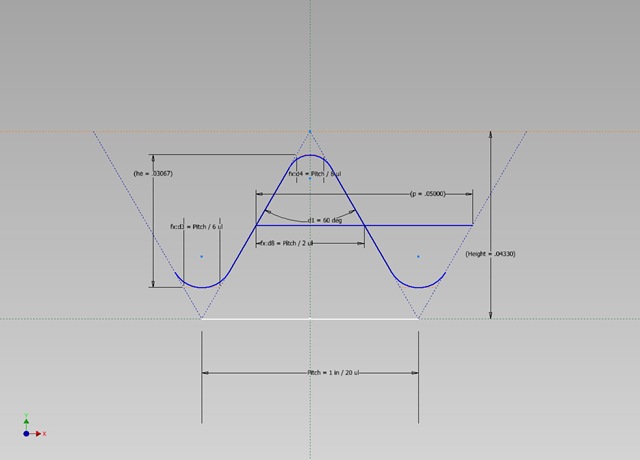
Unified and American screw internal thread profile- Autodesk Inventor 2012


Unified-and-American-screw-internal-thread Unified-and-American-screw-external-thread
 

In this video, I will show you how to create a thread profile for the Unified and American Screw thread (internal).With simple parameters and constraints we can create the sketch profile for this thread quite easily.

I did not applied detailed formula derived values in the beginning of sketch. But the final sketch proved the equations values itself.

The finished file is available for download for the Unified and American Screw internal and external both on the link below:--
http://bit.ly/2oOlPJg

Wednesday, December 22, 2010

Surfaces Feature -Autodesk Inventor Tutorial


Surfaces Feature -Autodesk Inventor Tutorial

In this video tutorial I will explain you how to model Tray. During this process you will learn Autodesk Inventor Surfaces features. We will create Surfaces with the help of 'Boundary Patch ' and Loft tools.
 Tray-View-1 Tray-View--2


HD Link for this video
To download the finished file, visit the following link:-- http://www.mediafire.com/?uh74cn5xpc9gg73