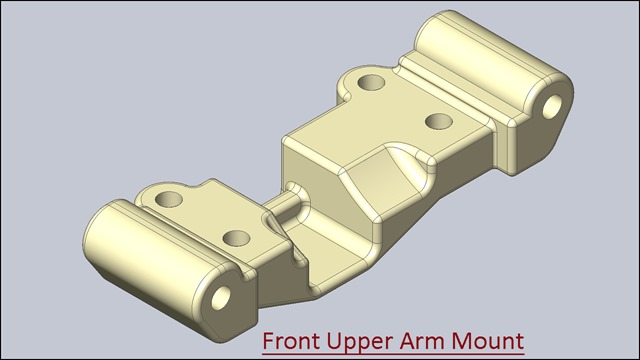
The Design of ‘Front Upper Arm Mount’ has been taken from Assembly file of 'Suspension' → ‘Sample files’ → Autodesk Inventor. Rest components of the model ‘Suspension Assembly’ (consisting in several numbers) have also been designed. You may watch them by visiting on following playlist: - https://www.youtube.com/playlist?list=PLKWX3xUP3pPpRpkNsubaQdZuTGcNh1-MJ
Front Upper Arm Mount (Video Tutorial) Siemens NX 10
The Design of ‘Front Upper Arm Mount’ has been taken from Assembly file of 'Suspension' → ‘Sample files’ → Autodesk Inventor. Rest components of the model ‘Suspension Assembly’ (consisting in several numbers) have also been designed. You may watch them by visiting on following playlist: - https://www.youtube.com/playlist?list=PLKWX3xUP3pPo0_EiKA9ypTPvI9h7A3lgX
.......................................................................................................... In this Siemens NX Tutorial we will describe how to build the model of ‘Front Upper Arm Mount’. It is a part modeling tutorial, it will cover the following topics. ___________________________________________________________ • Creating Sketches on different Planes of the model. • Use the sketch constraints with help of Geometric Constraints tool that are applied on during sketch creation. • Use feature commands such as Extrude, Unite, Rib, Pattern Feature with Linear option and Edge Blend tool. • Use Pattern feature tool to create multiple instances of one feature. • How to create a Rib feature for making a thin wall on the model.