Showing posts with label Arm. Show all posts

Tuesday, April 14, 2020

Pivot Arm (Siemens NX 1855 Tutorial)

Serial No. 124

Pivot Arm along with Drawing Sheet (Siemens NX 1855 Tutorial)

Designing a machine part from the 2D sketch. Dear Viewers, In this video we will show how to create a 3D model 'Pivot Arm' with the help of 2D drawing sheet in Siemens NX Software


Download the 2D drawing sheet in PDF form by visiting the following link: -- https://bit.ly/391iJCZ


.........................................................................
Visit the following link to watch more tutorial on Siemens NX by us
https://www.youtube.com/playlist?list=PLKWX3xUP3pPpUvtPuzEPoHimjTjpdbl_Q
.........................................................................
Hope all of you enjoyed the tutorial. If you find the video useful please like it and share it with your friends/colleagues and do not forget to subscribe me to get latest updates about my new uploads….
http://www.youtube.com/user/nisheethsorjm?sub_confirmation=1
....................................................................................................
Dear Viewers if you like our work and wanted to support us, to keep continuing the good work, then become a patron of ours at ‘Patreon’ site. Patreon is a simple way for you to contribute to the creator’s work every month/ every time they release their new work and get rewards in return. Please visit the following link to know all about our work and what we are offering as the reward to our patrons…
https://www.patreon.com/nisheethsri
..................................................................

Tuesday, May 23, 2017

Front Lower Arm Brace (Solid Edge ST9 Tutorial)

Front Lower Arm Brace

Serial No. 70

Front Lower Arm Brace (Solid Edge ST9 Tutorial)

The Design of ‘Front Lower Arm Brace’ has been taken from Assembly file of 'Suspension' → ‘Sample files’ → Autodesk Inventor.
Rest components of the model ‘Suspension Assembly’ (consisting in several numbers) have also been designed. You may watch them by visiting on following playlist: -
https://www.youtube.com/playlist?list=PLKWX3xUP3pPpRpkNsubaQdZuTGcNh1-MJ

download-Link


Click the following link to get the model file: - http://bit.ly/35m8iZO

Thursday, May 18, 2017

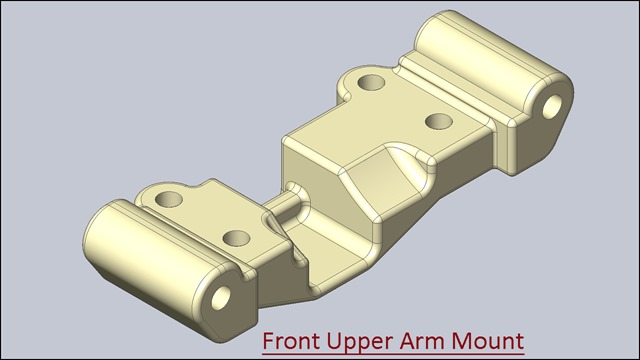
Front Upper Arm Mount (Solid Edge ST9 Tutorial)

Front Upper Arm Mount_1

Front Upper Arm Mount_2

Serial No. 69

Front Upper Arm Mount (Solid Edge ST9 Tutorial)

The Design of ‘Front Upper Arm Mount’ has been taken from Assembly file of 'Suspension' → ‘Sample files’ → Autodesk Inventor.
Rest components of the model ‘Suspension Assembly’ (consisting in several numbers) have also been designed. You may watch them by visiting on following playlist: -
https://www.youtube.com/playlist?list=PLKWX3xUP3pPpRpkNsubaQdZuTGcNh1-MJ

download-Link


Click the following link to get the model file: - http://bit.ly/2ASwipH

Saturday, April 29, 2017

Front Upper Arm (Solid Edge ST9 Tutorial)

Front Upper Arm_1

Front Upper Arm_2

Serial No. 55

Front Upper Arm (Solid Edge ST9 Tutorial)

The Design of ‘Front Upper Arm’ has been taken from Assembly file of 'Suspension' → ‘Sample files’ → Autodesk Inventor.
Rest components of the model ‘Suspension Assembly’ (consisting in several numbers) have also been designed. You may watch them by visiting on following playlist: -
https://www.youtube.com/playlist?list=PLKWX3xUP3pPpRpkNsubaQdZuTGcNh1-MJ

download-Link


Click the following link to get the model file: - http://bit.ly/2IAHPy6

Thursday, April 27, 2017

Front Lower Arm (Solid Edge ST9 Tutorial)

Front Lower Arm_1

Front Lower Arm_2

Serial No. 54

Front Lower Arm (Solid Edge ST9 Tutorial)

The Design of ‘Front Lower Arm ’ has been taken from Assembly file of 'Suspension' → ‘Sample files’ → Autodesk Inventor.
Rest components of the model ‘Suspension Assembly’ (consisting in several numbers) have also been designed. You may watch them by visiting on following playlist: -
https://www.youtube.com/playlist?list=PLKWX3xUP3pPpRpkNsubaQdZuTGcNh1-MJ


download-Link


Click the following link to get the model file: - http://bit.ly/2MtLDSX

Saturday, September 3, 2016

Front Upper Arm Mount (Video Tutorial) Siemens NX 10

Front Upper Arm Mount_1

Front Upper Arm Mount_2

Serial No. 46.

Front Upper Arm Mount (Video Tutorial) Siemens NX 10

The Design of ‘Front Upper Arm Mount’ has been taken from Assembly file of 'Suspension' → ‘Sample files’ → Autodesk Inventor.
Rest components of the model ‘Suspension Assembly’ (consisting in several numbers) have also been designed. You may watch them by visiting on following playlist: - https://www.youtube.com/playlist?list=PLKWX3xUP3pPo0_EiKA9ypTPvI9h7A3lgX

..........................................................................................................
In this Siemens NX Tutorial we will describe how to build the model of ‘Front Upper Arm Mount’. It is a part modeling tutorial, it will cover the following topics.
___________________________________________________________
• Creating Sketches on different Planes of the model.
• Use the sketch constraints with help of Geometric Constraints tool that are applied on during sketch creation.
• Use feature commands such as Extrude, Unite, Rib, Pattern Feature with Linear option and Edge Blend tool.
• Use Pattern feature tool to create multiple instances of one feature.
• How to create a Rib feature for making a thin wall on the model.


download-Link


Click the following link to get the model file: - http://bit.ly/2oUYghR

Front Upper Arm (Video Tutorial) Siemens NX 10

Front Upper Arm_1

Front Upper Arm_2

Serial No. 45.

Front Upper Arm (Video Tutorial) Siemens NX 10

The Design of ‘Front Upper Arm’ has been taken from Assembly file of 'Suspension' → ‘Sample files’ → Autodesk Inventor.
Rest components of the model ‘Suspension Assembly’ (consisting in several numbers) have also been designed. You may watch them by visiting on following playlist: - https://www.youtube.com/playlist?list=PLKWX3xUP3pPo0_EiKA9ypTPvI9h7A3lgX
..........................................................................................................

In this Siemens NX Tutorial we will describe how to build the model of ‘Front Upper Arm’. It is a part modeling tutorial, it will cover the following topics.
___________________________________________________________
• Creating Sketches on different Planes of the model.
• Use the sketch constraints with help of Geometric Constraints tool that are applied on during sketch creation.
• Use feature commands such as Extrude, Unite, Rib, Threaded Hole, Threads and Edge Blend tool.
• How the combine the two solid bodies into a single solid body by using Unite command.
• How to create a hole with threaded option by using Hole tool.
• How to create detailed thread on cylindrical face of solid body.
• How to create a Rib feature for making a thin wall on the model.


download-Link


Click the following link to get the model file: - http://bit.ly/35ejnMw

Friday, September 2, 2016

Front Lower Arm (Video Tutorial) Siemens NX 10

Front Lower Arm_1

Front Lower Arm_2

Serial No. 44.

Front Lower Arm (Video Tutorial) Siemens NX 10

The Design of ‘Front Lower Arm’ has been taken from Assembly file of 'Suspension' → ‘Sample files’ → Autodesk Inventor.
Rest components of the model ‘Suspension Assembly’ (consisting in several numbers) have also been designed. You may watch them by visiting on following playlist: - https://www.youtube.com/playlist?list=PLKWX3xUP3pPo0_EiKA9ypTPvI9h7A3lgX
..........................................................................................................
In this Siemens NX Tutorial we will describe how to build the model of ‘Front Lower Arm’. It is a part modeling tutorial, it will cover the following topics.
___________________________________________________________
• Creating Sketches on different Planes of the model.
• Use the sketch constraints with help of Geometric Constraints tool that are applied on during sketch creation.
• Use feature commands such as Extrude, Unite, Rib, Threaded Hole, Threads and Edge Blend tool.
• How the combine the two solid bodies into a single solid body by using Unite command.
• How to create a hole with threaded option by using Hole tool.
• How to create detailed thread on cylindrical face of solid body.
• How to create a Rib feature for making a thin wall on the model.


 download-Link


Click the following link to get the model file: - http://bit.ly/2ItVCqi

Friday, October 23, 2015

Front Upper Arm (Autodesk Inventor 2016 Tutorial)

Front Upper Arm_1

Front Upper Arm_2

Serial No. 264

Front Upper Arm  (Autodesk Inventor 2016 Tutorial)

The Design of the model ‘Front Upper Arm’ has been taken from Assembly file of 'Suspension' → ‘Sample files’ → Autodesk Inventor.

In this Inventor Tutorial we will describe how to build the model of ‘Front Lower Arm’. It is a part modelling tutorial, it will cover the following topics.

  • Creating 2D Sketches on different Planes of the model.
  • Use the sketch constraints that are applied on during sketch creation.
  • Use feature commands such as Extrude, Rib, Hole and the Fillet tool.
  • Adds the Tapped hole on the model by using Hole command.


download-Link


Click the following link to get the model file: -http://bit.ly/2muIrNX

Front Upper Arm (SolidWorks 2015 Tutorial)

Front Upper Arm_1

Front Upper Arm_2

Serial No. 190

Front Upper Arm (Video Tutorial) SolidWorks 2015

The Design of the model ‘Front Upper Arm’ has been taken from Assembly file of 'Suspension' → ‘Sample files’ → Autodesk Inventor.

In this SolidWorks Tutorial we will describe how to build the model of ‘Front Lower Arm’. It is a part modelling tutorial, it will cover the following topics.

  • Creating 2D Sketches on different Planes of the model.
  • Use the sketch constraints with the aid of ‘Add/Relation’ tool that are applied on during sketch creation.
  • Use feature commands such as Extruded Boss/Base, Extruded Cut, Rib, Hole Wizard and fillet tool.
  • Adds the Tapped hole with the cosmetic thread on the model by using Hole Wizard command.

download-Link


Click the following link to get the model file: -http://bit.ly/2pM4QYd

Front Lower Arm (Autodesk Inventor 2016 Tutorial)

Front Lower Arm_1

Front Lower Arm_2

Serial No. 263

Front Lower Arm  (Autodesk Inventor 2016 Tutorial)

The Design of the model ‘Front Lower Arm’ has been taken from Assembly file of 'Suspension' → ‘Sample files’ → Autodesk Inventor.

In this Inventor Tutorial we will describe how to build the model of ‘Front Lower Arm’. It is a part modelling tutorial, it will cover the following topics.

  • Creating 2D Sketches on different Planes of the model.
  • Use the sketch constraints that are applied on during sketch creation.
  • Use feature commands such as Extrude, Rib, Hole, Fillet and Chamfer tool.
  • Adds the Tapped hole on the model by using Hole command.


download-Link


Click the following link to get the model file: -http://bit.ly/2o9NeEL

Front Lower Arm (SolidWorks 2015 Tutorial)

Front Lower Arm_1

Front Lower Arm_2

Serial No. 189

Front Lower Arm (SolidWorks 2015 Tutorial)

The Design of the model ‘Front Lower Arm’ has been taken from Assembly file of 'Suspension' → ‘Sample files’ → Autodesk Inventor.

In this SolidWorks Tutorial we will describe how to build the model of ‘Front Lower Arm’. It is a part modelling tutorial, it will cover the following topics.

  • Creating 2D Sketches on different Planes of the model.
  • Use the sketch constraints with the aid of ‘Add/Relation’ tool that are applied on during sketch creation.
  • Use feature commands such as Extruded Boss/Base, Extruded Cut, Rib, Hole Wizard, Fillet and Chamfer tool.
  • Adds the Tapped hole with the cosmetic thread on the model by using Hole Wizard command.

download-Link


Click the following link to get the model file: -http://bit.ly/2IFsmgn

Thursday, October 15, 2015

Front Lower Arm Brace (Autodesk Inventor 2016 Tutorial)2016)

Front Lower Arm Brace

Serial No. 255

Front Lower Arm Brace  (Autodesk Inventor 2016 Tutorial)

The Design of the model ‘Front Lower Arm Brace’ has been taken from Assembly file of 'Suspension' → ‘Sample files’ → Autodesk Inventor.


download-Link


Click the following link to get the model file: -http://bit.ly/2o5NuVC

Front Lower Arm Brace (SolidWorks 2015 Tutorial)

Front Lower Arm Brace

Serial No. 181

Front Lower Arm Brace (SolidWorks 2015 Tutorial)

The Design of the model ‘Front Lower Arm Brace’ has been taken from Assembly file of 'Suspension' → ‘Sample files’ → Autodesk Inventor.


download-Link


Click the following link to get the model file: -http://bit.ly/2Otvn6O