Showing posts with label Siemens NX 1855 Tutorial. Show all posts

Thursday, March 2, 2023

Basic Part Modelling Ex.1 (Siemens NX 1855 Tutorial)


Capture

Serial No. 155.

Hello viewers, In this video we will show:-

1. 2D Sketch on ZC, YC & XC Datum Plane with the help of Line, Circle & Arc tools etc.

2. Different types of Extrude command operations like Inferrred, Unite & Subtract options.

3. Edge Blend tool. 4. How to create a simple hole over the part by using the Hole Wizard command.

5. About the Rib tool.

Hope all of you enjoyed the tutorial.

If you find the video helpful please like it and share it with your friends/colleagues and do not forget to subscribe to me to get the latest updates about my new uploads…. http://www.youtube.com/user/nisheethsorjm?sub_confirmation=1


Click the following link to get the model file: - http://bit.ly/3J3R6OO


.....................................................................
Visit the following link to watch more tutorial on Siemens NX by us
https://www.youtube.com/playlist?list=PLKWX3xUP3pPpUvtPuzEPoHimjTjpdbl_Q
.........................................................................
Hope all of you enjoyed the tutorial. If you find the video useful please like it and share it with your friends/colleagues and do not forget to subscribe me to get latest updates about my new uploads….
http://www.youtube.com/user/nisheethsorjm?sub_confirmation=1
....................................................................................................
Dear Viewers if you like our work and wanted to support us, to keep continuing the good work, then become a patron of ours at ‘Patreon’ site. Patreon is a simple way for you to contribute to the creator’s work every month/ every time they release their new work and get rewards in return. Please visit the following link to know all about our work and what we are offering as the reward to our patrons…
https://www.patreon.com/nisheethsri
...............................................................…  

Saturday, February 25, 2023

Basic Part Modelling (Siemens NX 1855 Tutorial)


Capture

Serial No. 154

Hello viewers, In this video we will show:-

1. Basic 2D Sketch on XY, YZ & XZ Datum Plane with the help of Line, Circle, Polygon & Arc tools etc.

2. Solid features tools like Extrude, Extrude with unit/subtract option.

3. Hole Wizard with Counterbore option.

4. Fillet tool.

5. Mirror Feature command.


Click the following link to get the model file: - http://bit.ly/3Zg7QYk


.....................................................................
Visit the following link to watch more tutorial on Siemens NX by us
https://www.youtube.com/playlist?list=PLKWX3xUP3pPpUvtPuzEPoHimjTjpdbl_Q
.........................................................................
Hope all of you enjoyed the tutorial. If you find the video useful please like it and share it with your friends/colleagues and do not forget to subscribe me to get latest updates about my new uploads….
http://www.youtube.com/user/nisheethsorjm?sub_confirmation=1
....................................................................................................
Dear Viewers if you like our work and wanted to support us, to keep continuing the good work, then become a patron of ours at ‘Patreon’ site. Patreon is a simple way for you to contribute to the creator’s work every month/ every time they release their new work and get rewards in return. Please visit the following link to know all about our work and what we are offering as the reward to our patrons…
https://www.patreon.com/nisheethsri
...............................................................…  

Thursday, February 16, 2023

Pneumatic Motor Assembly (Siemens NX 1855 Tutorial)


Pneumatic Motor_1


Pneumatic Motor_2


Serial No. 153

Pneumatic Motor Assembly (Siemens NX 1855 Tutorial)

Dear Viewers, Today we will design the 'Pneumatic Motor Assembly' in Pneumatic Motor Assembly Siemens NX 1855 version. This Assembly tutorial covers topics from NX Basics like 2-D sketching, Part/Assembly modelling. It contains 12 parts like a Crankshaft, Connecting Rod, Piston, Cylinder Head, Motor Block, Mounting Bracket etc., and One Assembly. First, we create the Base Plate part then later each component is created individually with no relation to each other which you can term the Bottom-up designing process. In this process, the twelve parts are designed individually, and afterwards the entire parts are inserted into the main assembly by using the assembly constraints. When the parts have been modified the changes also appear in the NX Assembly.

This Video will cover:-

1. Create basic 2D sketches on different datum planes like XY, YZ and XZ with the help of Line, Circle, Rectangle, 3 Point Arc, etc.

2. Create a solid feature by using the Extrude, Extruded with subtract/join option, Revolve, Fillet, Mirror Feature, Hole Feature with counterbore, threaded and simple options, Unite, Pattern/Mirror Feature and Chamfer commands.

3. Place the part in Assembly by using the Insert Components command.

4. Use the Assmebly 'Mate' command to position two components relative to one another by using such as Touch/Align, Infer Centre Axis, Concentric, mates, etc.

5. After completing this video we will display the animation of this model in the ‘Sequence’ Environment.

Hope all of you enjoyed the tutorial.


Click the following link to get the model file: - https://bit.ly/3Ic7dZ8


.....................................................................
Visit the following link to watch more tutorial on Siemens NX by us
https://www.youtube.com/playlist?list=PLKWX3xUP3pPpUvtPuzEPoHimjTjpdbl_Q
.........................................................................
Hope all of you enjoyed the tutorial. If you find the video useful please like it and share it with your friends/colleagues and do not forget to subscribe me to get latest updates about my new uploads….
http://www.youtube.com/user/nisheethsorjm?sub_confirmation=1
....................................................................................................
Dear Viewers if you like our work and wanted to support us, to keep continuing the good work, then become a patron of ours at ‘Patreon’ site. Patreon is a simple way for you to contribute to the creator’s work every month/ every time they release their new work and get rewards in return. Please visit the following link to know all about our work and what we are offering as the reward to our patrons…
https://www.patreon.com/nisheethsri
...............................................................…  

Wednesday, February 8, 2023

Chuck Jaw (Siemens NX 1855 Tutorial)


Chuck Jaw

Serial No. 152

Dear Viewers, we will create 'Chuck Jaw' in Siemens NX 1855 Software. In this, you will learn the full modelling process of this part.


Click the following link to get the model file: - https://bit.ly/3DSFsmK


.....................................................................
Visit the following link to watch more tutorial on Siemens NX by us
https://www.youtube.com/playlist?list=PLKWX3xUP3pPpUvtPuzEPoHimjTjpdbl_Q
.........................................................................
Hope all of you enjoyed the tutorial. If you find the video useful please like it and share it with your friends/colleagues and do not forget to subscribe me to get latest updates about my new uploads….
http://www.youtube.com/user/nisheethsorjm?sub_confirmation=1
....................................................................................................
Dear Viewers if you like our work and wanted to support us, to keep continuing the good work, then become a patron of ours at ‘Patreon’ site. Patreon is a simple way for you to contribute to the creator’s work every month/ every time they release their new work and get rewards in return. Please visit the following link to know all about our work and what we are offering as the reward to our patrons…
https://www.patreon.com/nisheethsri
...............................................................…  

Friday, February 3, 2023

3D Pipe with Flange (Siemens NX 1855 Tutorial)


888

Serial No. 151

3D Pipe with Flange (Siemens NX 1855 Tutorial)


Click the following link to get the model file: - https://bit.ly/3JE0Gsd


.....................................................................
Visit the following link to watch more tutorial on Siemens NX by us
https://www.youtube.com/playlist?list=PLKWX3xUP3pPpUvtPuzEPoHimjTjpdbl_Q
.........................................................................
Hope all of you enjoyed the tutorial. If you find the video useful please like it and share it with your friends/colleagues and do not forget to subscribe me to get latest updates about my new uploads….
http://www.youtube.com/user/nisheethsorjm?sub_confirmation=1
....................................................................................................
Dear Viewers if you like our work and wanted to support us, to keep continuing the good work, then become a patron of ours at ‘Patreon’ site. Patreon is a simple way for you to contribute to the creator’s work every month/ every time they release their new work and get rewards in return. Please visit the following link to know all about our work and what we are offering as the reward to our patrons…
https://www.patreon.com/nisheethsri
...............................................................…  

Wednesday, May 25, 2022

Siemens NX 1855 Surface Modelling Tutorial || Design Steel Spoon

Capture

Capture_1

Capture_3

Capture_2

Serial No. 150

Siemens NX 1855 Surface Modelling Tutorial ||  Design Steel Spoon

Hello Viewers, Today we will create a model 'Steel Spoon' with Surface Features in Siemens NX 1855 version. Friends, this video is going to be very important for you because today I will tell you how you can easily make this model with the help of surface tools like Swept Surface, Extend Sheet and Trim Sheet and at last, all the surfaces will be converted into a single surface by using the Sew Surface command after creating this we will give the Thickness by using the Thicken tool.

Hope you will like this tutorial.


Click the following link to get the model file: - https://bit.ly/39TPpnN


....................................................................
Visit the following link to watch more tutorial on Siemens NX by us
https://www.youtube.com/playlist?list=PLKWX3xUP3pPpUvtPuzEPoHimjTjpdbl_Q
.........................................................................
Hope all of you enjoyed the tutorial. If you find the video useful please like it and share it with your friends/colleagues and do not forget to subscribe me to get latest updates about my new uploads….
http://www.youtube.com/user/nisheethsorjm?sub_confirmation=1
....................................................................................................
Dear Viewers if you like our work and wanted to support us, to keep continuing the good work, then become a patron of ours at ‘Patreon’ site. Patreon is a simple way for you to contribute to the creator’s work every month/ every time they release their new work and get rewards in return. Please visit the following link to know all about our work and what we are offering as the reward to our patrons…
https://www.patreon.com/nisheethsri
...............................................................…  

Monday, May 9, 2022

Four Cylinder Engine Assembly (Siemens NX 1855 Tutorial)

Four Cylinder Engine Assembly

Four Cylinder Engine Assembly_1

Serial No. 149

Four Cylinder Engine Assembly (Siemens NX 1855 Tutorial)

Dear Viewers, Today we will design the 'Four-Cylinder Engine Assembly' in Siemens NX 1855 version. This Assembly tutorial covers topics from NX Basics like 2-D sketching, Part/Assembly modelling. The model contains 6 parts like a Crankshaft, Connecting Rod, Piston, etc., Two SubAssemblies and One Assembly. First, we create the Piston part then later each component is created individually with no relation to each other which you can term the Bottom-up designing process. In this process, the six parts are designed individually, and afterwards, all parts are inserted into the assembly by using the assembly constraints. When the parts have been modified the changes also appear in the assembly.

This Video will cover:-

1. Create basic 2D sketches on different datum planes like XY, YZ and XZ with the help of Line, Circle, Rectangle, 3 Point Arc, etc.

2. Create a solid feature by using the Extrude, Extruded with subtract option, Revolve, Revolve with subtract option, Fillet, Mirror Feature, Rotate/Move Feature, Unite, Pattern/Mirror Feature and Chamfer commands.

3. Place the part in Assembly by using the Insert Components command.

4. Use the 'Mate' command to position two components relative to one another by using such as Touch/Align, Infer Centre Axis, Concentric, mates, etc.

5. After completing this video we will display the animation of this model in the ‘Sequence’ Environment.

Hope all of you enjoyed the tutorial.


click the following link to get the model file: - https://bit.ly/3N1eOdw


.....................................................................
Visit the following link to watch more tutorial on Siemens NX by us
https://www.youtube.com/playlist?list=PLKWX3xUP3pPpUvtPuzEPoHimjTjpdbl_Q
.........................................................................
Hope all of you enjoyed the tutorial. If you find the video useful please like it and share it with your friends/colleagues and do not forget to subscribe me to get latest updates about my new uploads….
http://www.youtube.com/user/nisheethsorjm?sub_confirmation=1
....................................................................................................
Dear Viewers if you like our work and wanted to support us, to keep continuing the good work, then become a patron of ours at ‘Patreon’ site. Patreon is a simple way for you to contribute to the creator’s work every month/ every time they release their new work and get rewards in return. Please visit the following link to know all about our work and what we are offering as the reward to our patrons…
https://www.patreon.com/nisheethsri
...............................................................…  

Sunday, April 24, 2022

Crankshaft Assembly (Siemens NX 1855 Tutorial)

Serial No. 148

Crankshaft Assembly (Siemens NX 1855 Tutorial)

Hi Viewers, Today we have created two parts 'Crankshaft' and 'Connecting Rod Bearing' in Siemens NX 1855 Software. In this video, you will learn the full modelling process of the model. You will learn how to create basic 2D sketches on different Datum planes with the help of Line, Circle, and Rectangle tools and after this create the 3-D solid by using the Extrude, Revolve, Edge Blend commands, after completing the part we placed the parts in the Connecting Rod and Connecting Rod Cap Assembly by using Assembly Constraints like Touch/Align Constraint, Infer Centre Axis Constraints, Distance mate etc. Hope all of you enjoyed the tutorial.


Click the following link to get the model file: - https://bit.ly/3xuJwrg


.....................................................................
Visit the following link to watch more tutorial on Siemens NX by us
https://www.youtube.com/playlist?list=PLKWX3xUP3pPpUvtPuzEPoHimjTjpdbl_Q
.........................................................................
Hope all of you enjoyed the tutorial. If you find the video useful please like it and share it with your friends/colleagues and do not forget to subscribe me to get latest updates about my new uploads….
http://www.youtube.com/user/nisheethsorjm?sub_confirmation=1
....................................................................................................
Dear Viewers if you like our work and wanted to support us, to keep continuing the good work, then become a patron of ours at ‘Patreon’ site. Patreon is a simple way for you to contribute to the creator’s work every month/ every time they release their new work and get rewards in return. Please visit the following link to know all about our work and what we are offering as the reward to our patrons…
https://www.patreon.com/nisheethsri
...............................................................…  
Monday, April 11, 2022

Piston Assembly (Siemens NX 1855 Tutorial)

Serial No. 147

Hi Viewers, Today we have created a model named ‘Piston’ in Siemens NX 1855 Software. In this video, you will learn the full modelling process of this model after completing this part we placed the part in the Connecting Rod and Connecting Rod Cap Assembly. This assembly consists of 3 part files and two copies of the Bolt to make this assembly that is positioned according to design intent by using Assembly Constraints like Touch/Align Constraint, Infer Centre Axis Constraints etc. You will learn how to create basic 2D sketches on different Datum planes as well as Extrude, Revolve, Edge Blend, and create simple holes by using the 'Hole' command. Hope all of you enjoyed the tutorial.


Click the following link to get the model file: - https://bit.ly/3JrTiwx


......................................................................
Visit the following link to watch more tutorial on Siemens NX by us
https://www.youtube.com/playlist?list=PLKWX3xUP3pPpUvtPuzEPoHimjTjpdbl_Q
.........................................................................
Hope all of you enjoyed the tutorial. If you find the video useful please like it and share it with your friends/colleagues and do not forget to subscribe me to get latest updates about my new uploads….
http://www.youtube.com/user/nisheethsorjm?sub_confirmation=1
....................................................................................................
Dear Viewers if you like our work and wanted to support us, to keep continuing the good work, then become a patron of ours at ‘Patreon’ site. Patreon is a simple way for you to contribute to the creator’s work every month/ every time they release their new work and get rewards in return. Please visit the following link to know all about our work and what we are offering as the reward to our patrons…
https://www.patreon.com/nisheethsri
...............................................................…   

Friday, April 8, 2022

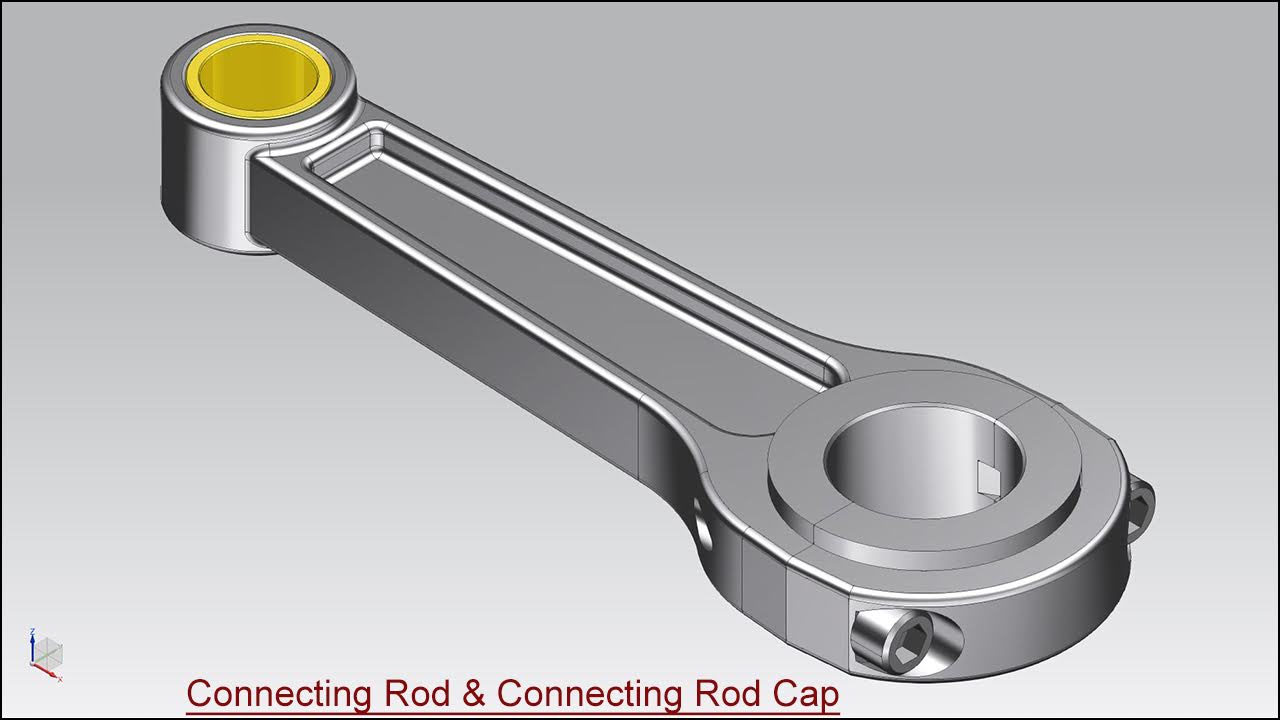
Connecting Rod and Connecting Rod Cap Assembly (Siemens NX 1855 Tutorial)

Serial No. 146

Connecting Rod and Connecting Rod Cap Assembly (Siemens NX 1855 Tutorial)

In this Siemens NX 1855 Assembly tutorial, we have created a model named ‘Connecting Rod and Connecting Rod Cap’. In this video, you will learn the full modelling process of this model and its components. This assembly consists of 2 part files and 1 Bolt to make this assembly that is positioned according to design intent by using Assembly Constraints like Touch/Align Constraint, Infer Centre Axis Constraints etc. You will learn how to create basic 2D sketches on different Datum planes as well as Extrude, Revolve, Chamfer, Edge Blend, Unite, Swept tools and create simple/counterbore holes by using the 'Hole' command and create two new solid bodies within one part file by using the under the Revolve tool.


Click the following link to get the model file: - https://bit.ly/3jhb235


......................................................................
Visit the following link to watch more tutorial on Siemens NX by us
https://www.youtube.com/playlist?list=PLKWX3xUP3pPpUvtPuzEPoHimjTjpdbl_Q
.........................................................................
Hope all of you enjoyed the tutorial. If you find the video useful please like it and share it with your friends/colleagues and do not forget to subscribe me to get latest updates about my new uploads….
http://www.youtube.com/user/nisheethsorjm?sub_confirmation=1
....................................................................................................
Dear Viewers if you like our work and wanted to support us, to keep continuing the good work, then become a patron of ours at ‘Patreon’ site. Patreon is a simple way for you to contribute to the creator’s work every month/ every time they release their new work and get rewards in return. Please visit the following link to know all about our work and what we are offering as the reward to our patrons…
https://www.patreon.com/nisheethsri
...............................................................…   

Saturday, April 2, 2022

Ball Bearing (Siemens NX 1855 Tutorial)

Serial No. 145

Ball Bearing (Siemens NX 1855 Tutorial)

Dear Viewers, We will create a model 'Ball Bearing' in Siemens NX 1855 Software. In this video, we will create a base 2D sketch with the help of the Rectangle, Circle and Line command over the datum plane and afterwards, revolve the base sketch by using the Revolve command as well as we will create a circular pattern of one small ball eight times for making this Bearing part.


Click the following link to get the model file: - https://bit.ly/3wMDIbW


......................................................................
Visit the following link to watch more tutorial on Siemens NX by us
https://www.youtube.com/playlist?list=PLKWX3xUP3pPpUvtPuzEPoHimjTjpdbl_Q
.........................................................................
Hope all of you enjoyed the tutorial. If you find the video useful please like it and share it with your friends/colleagues and do not forget to subscribe me to get latest updates about my new uploads….
http://www.youtube.com/user/nisheethsorjm?sub_confirmation=1
....................................................................................................
Dear Viewers if you like our work and wanted to support us, to keep continuing the good work, then become a patron of ours at ‘Patreon’ site. Patreon is a simple way for you to contribute to the creator’s work every month/ every time they release their new work and get rewards in return. Please visit the following link to know all about our work and what we are offering as the reward to our patrons…
https://www.patreon.com/nisheethsri
...............................................................…   

Tuesday, March 29, 2022

TEFC Nema MOTOR (Siemens NX 1855 Tutorial)

Serial No. 144

TEFC Nema Motor (Siemens NX 1855 Tutorial)

Dear Viewers, We will create a model 'TEFS NEMA MOTOR' in Siemens NX 1855 Software. In this video, you will learn how to create basic 2D sketches on various datum planes as well as Extrude, Chamfer, Edge Blend, Circular Pattern tools and create a simple hole by using the Hole command.


Click the following link to get the model file: - https://bit.ly/3Ny7g3k


......................................................................
Visit the following link to watch more tutorial on Siemens NX by us
https://www.youtube.com/playlist?list=PLKWX3xUP3pPpUvtPuzEPoHimjTjpdbl_Q
.........................................................................
Hope all of you enjoyed the tutorial. If you find the video useful please like it and share it with your friends/colleagues and do not forget to subscribe me to get latest updates about my new uploads….
http://www.youtube.com/user/nisheethsorjm?sub_confirmation=1
....................................................................................................
Dear Viewers if you like our work and wanted to support us, to keep continuing the good work, then become a patron of ours at ‘Patreon’ site. Patreon is a simple way for you to contribute to the creator’s work every month/ every time they release their new work and get rewards in return. Please visit the following link to know all about our work and what we are offering as the reward to our patrons…
https://www.patreon.com/nisheethsri
...............................................................…   

Saturday, March 26, 2022

Air Cooled Spindle Synchronous Motor Assembly (Siemens NX 1855 Tutorial)

Serial No. 143

Air Cooled Spindle Synchronous Motor Assembly (Siemens NX 1855 Tutorial)

Dear Viewers, we will create 'Air Cooled Spindle Synchronous Motor Assembly' in Siemens NX 1855 Software. This assembly consists of six components. Each part is created one by one and afterwards, all the components has been placed one by one in an Assembly by using the Assembly Constraints.


Click the following link to get the model file: - https://bit.ly/3IEULPN


Visit the following link to watch more tutorial on Siemens NX by us
https://www.youtube.com/playlist?list=PLKWX3xUP3pPpUvtPuzEPoHimjTjpdbl_Q
.........................................................................
Hope all of you enjoyed the tutorial. If you find the video useful please like it and share it with your friends/colleagues and do not forget to subscribe me to get latest updates about my new uploads….
http://www.youtube.com/user/nisheethsorjm?sub_confirmation=1
....................................................................................................
Dear Viewers if you like our work and wanted to support us, to keep continuing the good work, then become a patron of ours at ‘Patreon’ site. Patreon is a simple way for you to contribute to the creator’s work every month/ every time they release their new work and get rewards in return. Please visit the following link to know all about our work and what we are offering as the reward to our patrons…
https://www.patreon.com/nisheethsri
...............................................................…   

Wednesday, March 16, 2022

Four Jaw Chuck Assembly (Siemens NX 1855 Tutorial)

  Serial No. 142 

Four Jaw Chuck Assembly (Siemens NX 1855 Tutorial)

Dear Viewers, we will create 'Four Jaw Chuck Assembly' in Siemens NX 1855 Software. This assembly consists of five components.


Click the following link to get the model file: - https://bit.ly/3u2J93D


......................................................................
Visit the following link to watch more tutorial on Siemens NX by us
https://www.youtube.com/playlist?list=PLKWX3xUP3pPpUvtPuzEPoHimjTjpdbl_Q
.........................................................................
Hope all of you enjoyed the tutorial. If you find the video useful please like it and share it with your friends/colleagues and do not forget to subscribe me to get latest updates about my new uploads….
http://www.youtube.com/user/nisheethsorjm?sub_confirmation=1
....................................................................................................
Dear Viewers if you like our work and wanted to support us, to keep continuing the good work, then become a patron of ours at ‘Patreon’ site. Patreon is a simple way for you to contribute to the creator’s work every month/ every time they release their new work and get rewards in return. Please visit the following link to know all about our work and what we are offering as the reward to our patrons…
https://www.patreon.com/nisheethsri
...............................................................…   

Friday, March 4, 2022

Propeller (Siemens NX 1855 Tutorial)

Serial No. 141 

Propeller (Siemens NX 1855 Tutorial)

Dear Viewers, We will create a model 'Propeller' in Siemens NX 1855 Software. In this video, you will learn how to create 2D sketches, studio spline on multiple datum planes as well as Extrude feature with Intersect option, Revolve, Circular Pattern feature and thicken tools etc.


Click the following link to get the model file: - https://bit.ly/3vD8JyI


......................................................................
Visit the following link to watch more tutorial on Siemens NX by us
https://www.youtube.com/playlist?list=PLKWX3xUP3pPpUvtPuzEPoHimjTjpdbl_Q
.........................................................................
Hope all of you enjoyed the tutorial. If you find the video useful please like it and share it with your friends/colleagues and do not forget to subscribe me to get latest updates about my new uploads….
http://www.youtube.com/user/nisheethsorjm?sub_confirmation=1
....................................................................................................
Dear Viewers if you like our work and wanted to support us, to keep continuing the good work, then become a patron of ours at ‘Patreon’ site. Patreon is a simple way for you to contribute to the creator’s work every month/ every time they release their new work and get rewards in return. Please visit the following link to know all about our work and what we are offering as the reward to our patrons…
https://www.patreon.com/nisheethsri
...............................................................…   

Sunday, February 20, 2022

AC-Motor (Siemens NX 1855 Tutorial)


Serial No. 139   

AC-Motor (Siemens NX 1855 Tutorial)

Dear Viewers, we will create 'AC Motor' in Siemens NX 1855 Software. We have created a model named ‘AC-Motor’. This assembly consists of two components one is the motor and the second is the motor shaft which is placed in an assembly.


Click the following link to get the model file: - https://bit.ly/3sPSMSQ 


......................................................................
Visit the following link to watch more tutorial on Siemens NX by us
https://www.youtube.com/playlist?list=PLKWX3xUP3pPpUvtPuzEPoHimjTjpdbl_Q
.........................................................................
Hope all of you enjoyed the tutorial. If you find the video useful please like it and share it with your friends/colleagues and do not forget to subscribe me to get latest updates about my new uploads….
http://www.youtube.com/user/nisheethsorjm?sub_confirmation=1
....................................................................................................
Dear Viewers if you like our work and wanted to support us, to keep continuing the good work, then become a patron of ours at ‘Patreon’ site. Patreon is a simple way for you to contribute to the creator’s work every month/ every time they release their new work and get rewards in return. Please visit the following link to know all about our work and what we are offering as the reward to our patrons…
https://www.patreon.com/nisheethsri
...............................................................…   

Friday, January 7, 2022

Arbor Press Assembly (Siemens NX 1855 Tutorial)


Serial No. 139   

Arbor Press Assembly (Siemens NX 1855 Tutorial)

This Siemens NX 1855 Assembly tutorial which also covers topics from NX Basics like sketching and part modelling display a creation process of an assembly named ‘Arbor Press’. At the end of this video, we will create an Animation of this Assembly in Motion Environment. This model contains 10 part files. First, we create the Arbor_Press_frame then later each component is created individually with no relation to each other which you can term the Bottom-up designing process. In this process, the parts are designed individually then inserted into the assembly and set up by using their assembly constraints. When the parts have been modified the changes also appear in the NX assembly.


Click the following link to get the model file: - https://bit.ly/3eWEoBy 


......................................................................
Visit the following link to watch more tutorial on Siemens NX by us
https://www.youtube.com/playlist?list=PLKWX3xUP3pPpUvtPuzEPoHimjTjpdbl_Q
.........................................................................
Hope all of you enjoyed the tutorial. If you find the video useful please like it and share it with your friends/colleagues and do not forget to subscribe me to get latest updates about my new uploads….
http://www.youtube.com/user/nisheethsorjm?sub_confirmation=1
....................................................................................................
Dear Viewers if you like our work and wanted to support us, to keep continuing the good work, then become a patron of ours at ‘Patreon’ site. Patreon is a simple way for you to contribute to the creator’s work every month/ every time they release their new work and get rewards in return. Please visit the following link to know all about our work and what we are offering as the reward to our patrons…
https://www.patreon.com/nisheethsri
...............................................................…