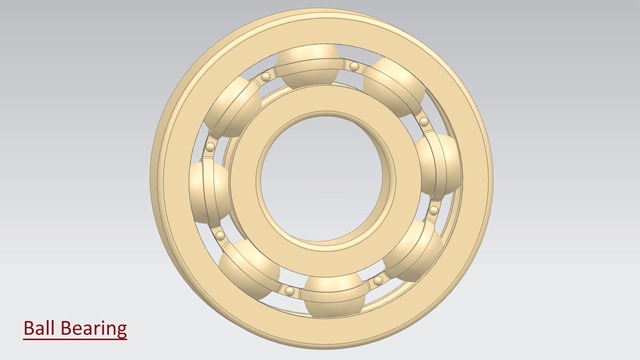
Dear Viewers, We will create a model 'Ball Bearing' in Siemens NX 1855 Software. In this video, we will create a base 2D sketch with the help of the Rectangle, Circle and Line command over the datum plane and afterwards, revolve the base sketch by using the Revolve command as well as we will create a circular pattern of one small ball eight times for making this Bearing part.
...................................................................... Visit the following link to watch more tutorial on Siemens NX by us https://www.youtube.com/playlist?list=PLKWX3xUP3pPpUvtPuzEPoHimjTjpdbl_Q ......................................................................... Hope all of you enjoyed the tutorial. If you find the video useful please like it and share it with your friends/colleagues and do not forget to subscribe me to get latest updates about my new uploads…. http://www.youtube.com/user/nisheethsorjm?sub_confirmation=1 .................................................................................................... Dear Viewers if you like our work and wanted to support us, to keep continuing the good work, then become a patron of ours at ‘Patreon’ site. Patreon is a simple way for you to contribute to the creator’s work every month/ every time they release their new work and get rewards in return. Please visit the following link to know all about our work and what we are offering as the reward to our patrons… https://www.patreon.com/nisheethsri ...............................................................…
Dear Viewers, We will create a model 'TEFS NEMA MOTOR' in Siemens NX 1855 Software. In this video, you will learn how to create basic 2D sketches on various datum planes as well as Extrude, Chamfer, Edge Blend, Circular Pattern tools and create a simple hole by using the Hole command.
...................................................................... Visit the following link to watch more tutorial on Siemens NX by us https://www.youtube.com/playlist?list=PLKWX3xUP3pPpUvtPuzEPoHimjTjpdbl_Q ......................................................................... Hope all of you enjoyed the tutorial. If you find the video useful please like it and share it with your friends/colleagues and do not forget to subscribe me to get latest updates about my new uploads…. http://www.youtube.com/user/nisheethsorjm?sub_confirmation=1 .................................................................................................... Dear Viewers if you like our work and wanted to support us, to keep continuing the good work, then become a patron of ours at ‘Patreon’ site. Patreon is a simple way for you to contribute to the creator’s work every month/ every time they release their new work and get rewards in return. Please visit the following link to know all about our work and what we are offering as the reward to our patrons… https://www.patreon.com/nisheethsri ...............................................................…
...................................................................... Visit the following link to watch more tutorial on Siemens NX by us https://www.youtube.com/playlist?list=PLKWX3xUP3pPpUvtPuzEPoHimjTjpdbl_Q ......................................................................... Hope all of you enjoyed the tutorial. If you find the video useful please like it and share it with your friends/colleagues and do not forget to subscribe me to get latest updates about my new uploads…. http://www.youtube.com/user/nisheethsorjm?sub_confirmation=1 .................................................................................................... Dear Viewers if you like our work and wanted to support us, to keep continuing the good work, then become a patron of ours at ‘Patreon’ site. Patreon is a simple way for you to contribute to the creator’s work every month/ every time they release their new work and get rewards in return. Please visit the following link to know all about our work and what we are offering as the reward to our patrons… https://www.patreon.com/nisheethsri ...............................................................…
Dear Viewers, We will create a model 'Propeller' in Siemens NX 1855 Software. In this video, you will learn how to create 2D sketches, studio spline on multiple datum planes as well as Extrude feature with Intersect option, Revolve, Circular Pattern feature and thicken tools etc.
...................................................................... Visit the following link to watch more tutorial on Siemens NX by us https://www.youtube.com/playlist?list=PLKWX3xUP3pPpUvtPuzEPoHimjTjpdbl_Q ......................................................................... Hope all of you enjoyed the tutorial. If you find the video useful please like it and share it with your friends/colleagues and do not forget to subscribe me to get latest updates about my new uploads…. http://www.youtube.com/user/nisheethsorjm?sub_confirmation=1 .................................................................................................... Dear Viewers if you like our work and wanted to support us, to keep continuing the good work, then become a patron of ours at ‘Patreon’ site. Patreon is a simple way for you to contribute to the creator’s work every month/ every time they release their new work and get rewards in return. Please visit the following link to know all about our work and what we are offering as the reward to our patrons… https://www.patreon.com/nisheethsri ...............................................................…
Dear Viewers, we will create 'AC Motor' in Siemens NX 1855 Software. We have created a model named ‘AC-Motor’. This assembly consists of two components one is the motor and the second is the motor shaft which is placed in an assembly.
...................................................................... Visit the following link to watch more tutorial on Siemens NX by us https://www.youtube.com/playlist?list=PLKWX3xUP3pPpUvtPuzEPoHimjTjpdbl_Q ......................................................................... Hope all of you enjoyed the tutorial. If you find the video useful please like it and share it with your friends/colleagues and do not forget to subscribe me to get latest updates about my new uploads…. http://www.youtube.com/user/nisheethsorjm?sub_confirmation=1 .................................................................................................... Dear Viewers if you like our work and wanted to support us, to keep continuing the good work, then become a patron of ours at ‘Patreon’ site. Patreon is a simple way for you to contribute to the creator’s work every month/ every time they release their new work and get rewards in return. Please visit the following link to know all about our work and what we are offering as the reward to our patrons… https://www.patreon.com/nisheethsri ...............................................................…
......................................................................... Visit the following link to watch more tutorial on Siemens NX by us https://www.youtube.com/playlist?list=PLKWX3xUP3pPpUvtPuzEPoHimjTjpdbl_Q ......................................................................... Hope all of you enjoyed the tutorial. If you find the video useful please like it and share it with your friends/colleagues and do not forget to subscribe me to get latest updates about my new uploads…. http://www.youtube.com/user/nisheethsorjm?sub_confirmation=1 .................................................................................................... Dear Viewers if you like our work and wanted to support us, to keep continuing the good work, then become a patron of ours at ‘Patreon’ site. Patreon is a simple way for you to contribute to the creator’s work every month/ every time they release their new work and get rewards in return. Please visit the following link to know all about our work and what we are offering as the reward to our patrons… https://www.patreon.com/nisheethsri ..................................................................
......................................................................... Visit the following link to watch more tutorial on Siemens NX by us https://www.youtube.com/playlist?list=PLKWX3xUP3pPpUvtPuzEPoHimjTjpdbl_Q ......................................................................... Hope all of you enjoyed the tutorial. If you find the video useful please like it and share it with your friends/colleagues and do not forget to subscribe me to get latest updates about my new uploads…. http://www.youtube.com/user/nisheethsorjm?sub_confirmation=1 .................................................................................................... Dear Viewers if you like our work and wanted to support us, to keep continuing the good work, then become a patron of ours at ‘Patreon’ site. Patreon is a simple way for you to contribute to the creator’s work every month/ every time they release their new work and get rewards in return. Please visit the following link to know all about our work and what we are offering as the reward to our patrons… https://www.patreon.com/nisheethsri ..................................................................
......................................................................... Visit the following link to watch more tutorial on Siemens NX by us https://www.youtube.com/playlist?list=PLKWX3xUP3pPpUvtPuzEPoHimjTjpdbl_Q ......................................................................... Hope all of you enjoyed the tutorial. If you find the video useful please like it and share it with your friends/colleagues and do not forget to subscribe me to get latest updates about my new uploads…. http://www.youtube.com/user/nisheethsorjm?sub_confirmation=1 .................................................................................................... Dear Viewers if you like our work and wanted to support us, to keep continuing the good work, then become a patron of ours at ‘Patreon’ site. Patreon is a simple way for you to contribute to the creator’s work every month/ every time they release their new work and get rewards in return. Please visit the following link to know all about our work and what we are offering as the reward to our patrons… https://www.patreon.com/nisheethsri ..................................................................
......................................................................... Visit the following link to watch more tutorial on Siemens NX by us https://www.youtube.com/playlist?list=PLKWX3xUP3pPpUvtPuzEPoHimjTjpdbl_Q ......................................................................... Hope all of you enjoyed the tutorial. If you find the video useful please like it and share it with your friends/colleagues and do not forget to subscribe me to get latest updates about my new uploads…. http://www.youtube.com/user/nisheethsorjm?sub_confirmation=1 .................................................................................................... Dear Viewers if you like our work and wanted to support us, to keep continuing the good work, then become a patron of ours at ‘Patreon’ site. Patreon is a simple way for you to contribute to the creator’s work every month/ every time they release their new work and get rewards in return. Please visit the following link to know all about our work and what we are offering as the reward to our patrons… https://www.patreon.com/nisheethsri ..................................................................
........................................................................ Visit the following link to watch more tutorial on Siemens NX by us https://www.youtube.com/playlist?list=PLKWX3xUP3pPpUvtPuzEPoHimjTjpdbl_Q ......................................................................... Hope all of you enjoyed the tutorial. If you find the video useful please like it and share it with your friends/colleagues and do not forget to subscribe me to get latest updates about my new uploads…. http://www.youtube.com/user/nisheethsorjm?sub_confirmation=1 .................................................................................................... Dear Viewers if you like our work and wanted to support us, to keep continuing the good work, then become a patron of ours at ‘Patreon’ site. Patreon is a simple way for you to contribute to the creator’s work every month/ every time they release their new work and get rewards in return. Please visit the following link to know all about our work and what we are offering as the reward to our patrons… https://www.patreon.com/nisheethsri ...............................................................
Dear Viewers, In this video we will show how to create an Eye Wash Cup in Siemens NX 1855 Software. This model is built by using 'Filled Surface ' command. Hope you will enjoy this tutorial. Please subscribe to our channel to get the latest updates and share this video their friends and colleagues.
........................................................................ Visit the following link to watch more tutorial on Siemens NX by us https://www.youtube.com/playlist?list=PLKWX3xUP3pPpUvtPuzEPoHimjTjpdbl_Q ......................................................................... Hope all of you enjoyed the tutorial. If you find the video useful please like it and share it with your friends/colleagues and do not forget to subscribe me to get latest updates about my new uploads…. http://www.youtube.com/user/nisheethsorjm?sub_confirmation=1 .................................................................................................... Dear Viewers if you like our work and wanted to support us, to keep continuing the good work, then become a patron of ours at ‘Patreon’ site. Patreon is a simple way for you to contribute to the creator’s work every month/ every time they release their new work and get rewards in return. Please visit the following link to know all about our work and what we are offering as the reward to our patrons… https://www.patreon.com/nisheethsri ...............................................................
Dear Viewers, In this video we will show how to create a clamp of ceiling fan in Siemens NX 1855 Software. The clamp of a ceiling fan will be created in context of an assembly by using 'Create New Component' command. We will tell you how to create a 'Swept' feature with the guide curves option for making the clamp. Hope you will enjoy this tutorial. Please subscribe to our channel to get the latest updates and share this video their friends and colleagues.
........................................................................
Visit the following link to watch more tutorial on Siemens NX by us https://www.youtube.com/playlist?list=PLKWX3xUP3pPpUvtPuzEPoHimjTjpdbl_Q
.........................................................................
Hope all of you enjoyed the tutorial. If you find the video useful please like it and share it with your friends/colleagues and do not forget to subscribe me to get latest updates about my new uploads…. http://www.youtube.com/user/nisheethsorjm?sub_confirmation=1
....................................................................................................
Dear Viewers if you like our work and wanted to support us, to keep continuing the good work, then become a patron of ours at ‘Patreon’ site. Patreon is a simple way for you to contribute to the creator’s work every month/ every time they release their new work and get rewards in return. Please visit the following link to know all about our work and what we are offering as the reward to our patrons… https://www.patreon.com/nisheethsri ..................................................................
In this Siemens NX, 11 tutorial viewer will learn about surface modelling. The following topics of surface/ general part modelling of the aforesaid software are discussed in the video…… ............................................................................................ • How to place some predefined sketches as a (.stp) file into the Siemens NX Part file with the help of ‘Add Components’ command assemble tab. • How to use 'Wave Geometry Linker' command • How to use 2D & 3D Spline and curve on different work planes. • Creating several surfaces by using Through Curves command, Filled surface command, Extrude surface command, Sew command and Swept command etc. • How to trim extended surfaces by using ‘Trim Sheet’ command. • Stitch all the surfaces to convert them into a single surface body by using 'Sew' tool. • Adding thickness to the final formed surface to develop a new solid by using ‘Thicken’ command. Hope you will enjoy this tutorial. Please subscribe to our channel to get the latest updates and share this video their friends and colleagues.
................................................................................... Our motive to upload this video is to show our workability/experience and to share my knowledge with the viewers and learners. ......................................................................... Visit the following link to watch more tutorial on Siemens NX by us https://www.youtube.com/playlist?list=PLKWX3xUP3pPpUvtPuzEPoHimjTjpdbl_Q ......................................................................... Hope all of you enjoyed the tutorial. If you find the video useful please like it and share it with your friends/colleagues and do not forget to subscribe me to get latest updates about my new uploads…. http://www.youtube.com/user/nisheethsorjm?sub_confirmation=1 .................................................................................................... Dear Viewers if you like our work and wanted to support us, to keep continuing the good work, then become a patron of ours at ‘Patreon’ site. Patreon is a simple way for you to contribute to the creator’s work every month/ every time they release their new work and get rewards in return. Please visit the following link to know all about our work and what we are offering as the reward to our patrons… https://www.patreon.com/nisheethsri
In this Siemens NX 11 Tutorial, we will create an assembly of Rocker Arm which is a component of Engine. While creating this model we will observe as well as learn various part and assembly modelling techniques of Siemens NX software. First components of assembly named Rocker Arm Pin_1 & 2, Rocker Arm Roll and Rocker Arm and later with the help of them the final assembly will be created. .................................................................................... The model designing concept is taken from videos available on YouTube. ....................................................................................
.................................................................................... Visit the following link to watch more tutorial on Siemens NX by us
Hope all of you enjoyed the tutorial. If you find the video useful please like it and share it with you friends/colleagues and do not forget to subscribe me to get latest updates about my new uploads….
Dear Viewers if you like our work and wanted to support us, in keep continuing the good work, then become a patron of ours at ‘Patreon’ site. Patreon is a simple way for you to contribute to creator’s work every month/ every time they release their new work and get rewards in return. Please visit following link to know all about our work and what we are offering as reward to our patrons…
In this Siemens NX 11 Tutorial, we will create a model of Ball Bearing. First of all components of Ball Bearing — Outer ring, Inner ring, Cage, Rivet and Ball will be created. With the help of these components final assembly will be created. So viewers will be able to observe and learn part and assembly modelling techniques.
Hope all of you enjoyed the tutorial. If you find the video useful please like it and share it with your friends/colleagues and do not forget to subscribe me to get latest updates about my new uploads….
Dear Viewers if you like our work and wanted to support us, in keep continuing the good work, then become a patron of ours at ‘Patreon’ site. Patreon is a simple way for you to contribute to creator’s work every month/ every time they release their new work and get rewards in return. Please visit following link to know all about our work and what we are offering as a reward to our patrons…
This Siemens NX video tutorial demonstrates the way to create a realistic looking knurling on a cylindrical face in Siemens NX.……………………………………………………………………………………………………….
Note:-
To get faster update in feature pattern and better knurling change the following settings in Swept (10) feature:-
1. Turn on the ‘preserve shape’ option in the selection location field.
2. Change the orientation method of the sweep from ‘Fixed’ to ‘Face Normal’.
……………………………………………………………………………………………………….
The model displayed in video is used as a component in the assembly of Pipe Wrench created earlier by us.
The modeling process of Pipe wrench which is available in two volumes, can be watched on following link... (1) https://youtu.be/8scpgSsermQ, (2) https://youtu.be/4o-ggjtTia4
The video covers the application of 2D sketching, 3D features like Extrude, Wrap Curve, Swept, Circular Pattern, Subtract, Offset Face and Mirror Geometry.
In this Siemens NX 11 Tutorial, we will create a model of Engine Block which is a component of an Engine Assembly. By watching this tutorial viewers will be able to observe and learn various 2D sketching techniques, application of Extrude, Rib, Mirror, Unite, Pattern, Fillet etc. Tools.
Hope all of you enjoyed the tutorial. If you find the video useful please like it and share it with you friends/colleagues and do not forget to subscribe me to get latest updates about my new uploads….
Dear Viewers if you like our work and wanted to support us, in keep continuing the good work, then become a patron of ours at ‘Patreon’ site. Patreon is a simple way for you to contribute to creator’s work every month/ every time they release their new work and get rewards in return. Please visit following link to know all about our work and what we are offering as reward to our patrons…