Tuesday, May 29, 2018

Selecting Geometry smartly Using Curve Rule in Siemens NX

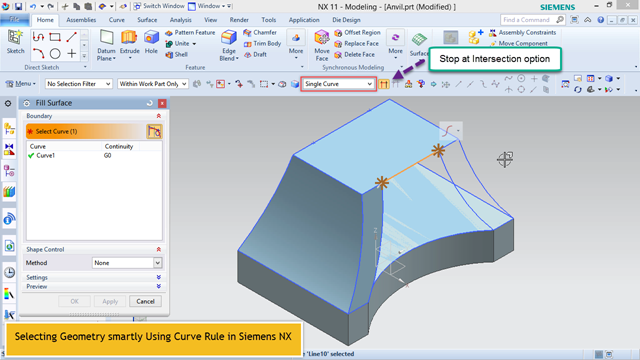
Selecting Geometry smartly Using Curve Rule in Siemens NX (Time 0_01_56;09)

In this Siemens Nx 11 tutorial we will learn how to smartly use Curve Rule command available to define fewer number of selections while using many NX tools. We will also observe Stop at intersection option which is used in combination with the Curve Rule setting that lets you specify which portions of the section curves to use.
 

Video Transcription
  1. Here are some sketches drawn on different Datum Planes which means these all are not connected at all. With the help of these, we need to create a closed surface.
  2. Activate Fill Surface Tool.
  3. Before Selecting Curves, we will examine different options listed in Curve Rule dialogue box.
  4. We can choose Region Boundary curve by which we can select a region surrounded by a connected curve. The same can be done by 'Connected Curves' option.
  5. Now see how 'Single Curve' option can be used here.
  6. Here we need to select a specific portion of the curve, so activate Stop at intersection option to get the desired result.
  7. Now we are able to easily select a specific portion of the curves.

download-Link


Visit following link to get related finished tutorial file..

https://autode.sk/2IUFXCi


Related Previous Tutorial

....................................................................................
Visit the following link to watch more tutorial on Siemens NX by us
https://www.youtube.com/playlist?list=PLKWX3xUP3pPpUvtPuzEPoHimjTjpdbl_Q
.........................................................................
Hope all of you enjoyed the tutorial. If you find the video useful please like it and share it with you friends/colleagues and do not forget to subscribe me to get latest updates about my new uploads….
http://www.youtube.com/user/nisheethsorjm?sub_confirmation=1
....................................................................................................
Dear Viewers if you like our work and wanted to support us, in keep continuing the good work, then become a patron of ours at ‘Patreon’ site. Patreon is a simple way for you to contribute to creator’s work every month/ every time they release their new work and get rewards in return. Please visit following link to know all about our work and what we are offering as reward to our patrons…
https://www.patreon.com/nisheethsri

Wednesday, May 23, 2018

Engine Block || Creo Parametric Tutorial


In this Creo Tutorial, we will create a model of Engine Block which is a component of Engine assembly. It is a part modelling tutorial so viewers will be able to watch various part modelling techniques of ‘Creo Parametric 4.0’ software like Extrude, Revolve Tool, Geometry Pattern, Round and Auto Round etc.

....................................................................................
The model designing concept is taken from videos available on YouTube.
....................................................................................

....................................................................................

download-Link


Visit the following link to get the model file…

http://bit.ly/2Wa9YS1


...................................................

Visit the following link to watch basic tutorials on Creo Parametric by me

https://www.youtube.com/playlist?list=PLhloyISzAQksnPmtyZtncWCQJ3NpoX_SW

.........................................................................

To watch detailed tutorials on the same software visit the following link:--

https://www.youtube.com/playlist?list=PLKWX3xUP3pPorULULn8Q5BbDXqBjK_ZXD

..........................................................................................

Hope all of you will enjoyed the tutorial. If you find the video useful please like it and share it with your friends/colleagues and do not forget to subscribe us to get latest updates about our new uploads.

http://www.youtube.com/user/nisheethsorjm?sub_confirmation=1

....................................................................................................

Dear Viewers if you like our work and wanted to support us, in keep continuing the good work, then become a patron of ours at ‘Patreon’ site. Patreon is a simple way for you to contribute to creator’s work every month/ every time they release their new work and get rewards in return. Please visit the following link to know all about our work and what we are offering as a reward to our patrons…

https://www.patreon.com/nisheethsri

Tuesday, May 8, 2018

Engine Block || Autodesk Inventor Tutorial

Engine Block Autodesk Inventor (Time 0_00_02;00)

In this Inventor Tutorial, we will create a model of Engine Block which is a component of Engine assembly. While creating this model we will observe as well as learn various part modelling techniques of Autodesk Inventor software.
....................................................................................
The model designing concept is taken from videos available on YouTube.
....................................................................................

download-Link


Visit the following link to get the model file…

  http://bit.ly/36fu8yC


...................................................

Visit the following link to watch basic tutorial on Autodesk Inventor by us

https://www.youtube.com/playlist?list=PLb-IhKRMYSERYpB48aY-sZ10fN6CfXIL4

.........................................................................

To watch detailed tutorials on the same software visit the following link

https://www.youtube.com/playlist?list=PL74BDF7431ED13443

..........................................................................................

Hope all of you enjoyed the tutorial. If you find the video useful please like it and share it with your friends/colleagues and do not forget to Subscribe us to get latest updates about our new uploads.

http://www.youtube.com/user/nisheethsorjm?sub_confirmation=1

....................................................................................................

Dear Viewers if you like our work and wanted to support us, in keep continuing the good work, then become a patron of ours at ‘Patreon’ site. Patreon is a simple way for you to contribute to creator’s work every month/ every time they release their new work and get rewards in return. Please visit following link to know all about our work and what we are offering as reward to our patrons…

https://www.patreon.com/nisheethsri