Showing posts with label mates. Show all posts

Saturday, June 4, 2016

Degrees of Freedom Analysis || Autodesk Inventor Basics

Degrees of Freedom Analysis -- Autodesk Inventor Basics

In this tutorial we will learn what ‘Degrees of Freedom Analysis’ (DOF) is and how it is utilized, to apply proper mates, so that we can control the movement of component in an assembly.

Each unconstrained component, existing within an assembly file, possesses six degrees of freedom initially. By applying proper constraints we can control the movement of parts in an assembly. But to apply proper mates to get desired result, it is necessary to analyze the movement of a component in the assembly. This tool is quite useful for this purpose.

...................................................

Visit the following link to watch basic tutorial on Autodesk Inventor by us

https://www.youtube.com/playlist?list=PLb-IhKRMYSERYpB48aY-sZ10fN6CfXIL4

.........................................................................

To watch detailed tutorials on the same software visit the following link

https://www.youtube.com/playlist?list=PL74BDF7431ED13443

..........................................................................................

Hope all of you will enjoyed the tutorial. If you find the video useful please like it and share it with your friends/colleagues and do not forget to subscribe us to get latest updates about our new uploads.

http://www.youtube.com/user/nisheethsorjm?sub_confirmation=1

....................................................................................................

Thursday, October 9, 2014

Vise (Volume-1) SolidWorks 2014 Tutorial


Serial No. 24-A

Vise (Volume-1) SolidWorks 2014 Tutorial 

In this tutorial we will display the creation process of an assembly named 'Vise'.  It will be created by using part modelling /assembly modelling functionality of SolidWorks Software.
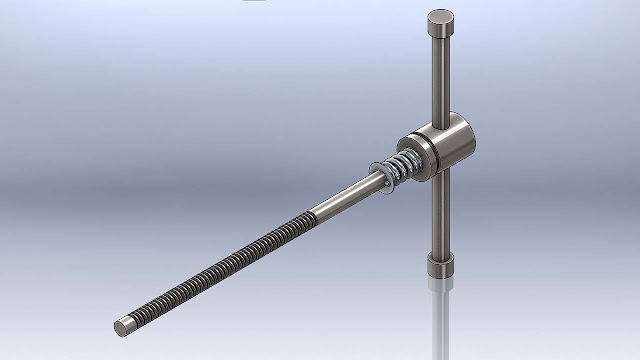
The Vise model has three sub-assemblies.  Each assembly is has modelled part as well as Tool Box components or standard parts. The parts are to be created individually not in context or with reference of other parts of the assembly, after wards they are placed into the assembly and by using assembly mates they are fitted according to the design.
So in this way viewers will be able to observe lot of basic sketching and application of different tools in part modelling along with assembly mates.

Exploded view of Sub-assembly-1 of Vise
Exploded view of Sub-assembly-2 of Vise
Exploded view of Sub-assembly-3 of Vise


The next part of the video can be watched on following link..

The animation of this model can be created by visiting the following link:--

If you want to get the newer version of this video, we have uploaded this video with audio narration only One Volume on our YouTube channel.  Please you can watch this video so that you can understand it easily.


Click the following link to get the model file: - http://bit.ly/2os7Fgk


....................................................................................
Visit the following link to watch the basic tutorial on SolidWorks by us
https://www.youtube.com/playlist?list=PLb-IhKRMYSES3Zw3QHmQVqQ-rcFVzgYHy
.........................................................................
To watch more detailed tutorials on the same software visit the following link
https://www.youtube.com/playlist?list=PLKWX3xUP3pPo77gFCyy669sI76qJa5jKw
...................................................................................
Hope all of you enjoyed the tutorial. If you find the video useful please like it and share it with your friends/colleagues and do not forget to subscribe us to get latest updates about our new uploads.
http://www.youtube.com/user/nisheethsorjm?sub_confirmation=1
....................................................................................................
Dear Viewers if you like our work and wanted to support us, to keep continuing the good work, then become a patron of ours at ‘Patreon’ site. Patreon is a simple way for you to contribute to the creator’s work every month/ every time they release their new work and get rewards in return. Please visit the following link to know all about our work and what we are offering a reward to our patrons…
https://www.patreon.com/nisheethsri
...................................................................................................................................

Vise (Volume-2) SolidWorks 2014 Tutorial


Serial No. 24-B

Vise (Volume-2) SolidWorks 2014 Tutorial


In this tutorial we will display the creation process of an assembly named 'Vise'.  It will be created by using part modelling /assembly modelling functionality of SolidWorks Software.
The Vise model has three sub-assemblies.  Each assembly is has modelled part as well as Tool Box components or standard parts. The parts are to be created individually not in context or with reference of other parts of the assembly, after wards they are placed into the assembly and by using assembly mates they are fitted according to the design.
So in this way viewers will be able to observe lot of basic sketching and application of different tools in part modelling along with assembly mates.

Exploded view of Sub-assembly-1 of Vise
Exploded view of Sub-assembly-2 of Vise
Exploded view of Sub-assembly-3 of Vise


The previous part of the video can be watched on following link..
The animation of this model can be created by visiting the following link:--

If you want to get the newer version of this video, we have uploaded this video with audio narration only One Volume on our YouTube channel.  You can play this video so that you can understand it easily.


download-Link


Click the following link to get the model file: - http://bit.ly/2os7Fgk


....................................................................................
Visit the following link to watch the basic tutorial on SolidWorks by us
https://www.youtube.com/playlist?list=PLb-IhKRMYSES3Zw3QHmQVqQ-rcFVzgYHy
.........................................................................
To watch more detailed tutorials on the same software visit the following link
https://www.youtube.com/playlist?list=PLKWX3xUP3pPo77gFCyy669sI76qJa5jKw
...................................................................................
Hope all of you enjoyed the tutorial. If you find the video useful please like it and share it with your friends/colleagues and do not forget to subscribe us to get latest updates about our new uploads.
http://www.youtube.com/user/nisheethsorjm?sub_confirmation=1
....................................................................................................
Dear Viewers if you like our work and wanted to support us, to keep continuing the good work, then become a patron of ours at ‘Patreon’ site. Patreon is a simple way for you to contribute to the creator’s work every month/ every time they release their new work and get rewards in return. Please visit the following link to know all about our work and what we are offering a reward to our patrons…
https://www.patreon.com/nisheethsri
...................................................................................................................................