In this SolidWorks tutorial we will create a model named ‘Ball Valve’. Its internal components are created up to a moderate level.
This tutorial will give the intermediate-level user a good practice of Extruded Boss/Base Tool along with Revolved Boss/Base Tool, Fillet Tool, Chamfer Tool and 2D sketching on different planes.
In this SolidWorks tutorial, we will learn about the basic techniques that will give a beginner quick start-up knowledge of the software by developing a ‘Fork’ model. The model is the part of a Scooter Assembly.
The video demonstrates utilization of Extruded Boss/Base Tool, Shell Tool, Swept Boss/Base Tool, Lofted Boss/Base Mirror Tool, Fillet and Chamfer Tool along with basic 2D and 3D sketching.
In this SolidWorks tutorial we will learn about the basic techniques that will give a beginner quick start up knowledge of the software by developing a ‘Wheel’ model. The model is the part of a Scooter Assembly.
The video demonstrates utilization of Extrude Boss/Base Tool, Revolved Boss/Base Tool, Circular Pattern Tool, Mirror Tool and changing Material type along with basic 2D sketching.
In this SolidWorks tutorial we will learn about the basic techniques that will give a beginner quick start-up knowledge of the software by developing a ‘Tire’ model. The model is the part of a Scooter Assembly.
Two different approaches are demonstrated to develop this model, one by using the Extrude Boss/Base Tool and another by using Revolved Base/Boss Tool.
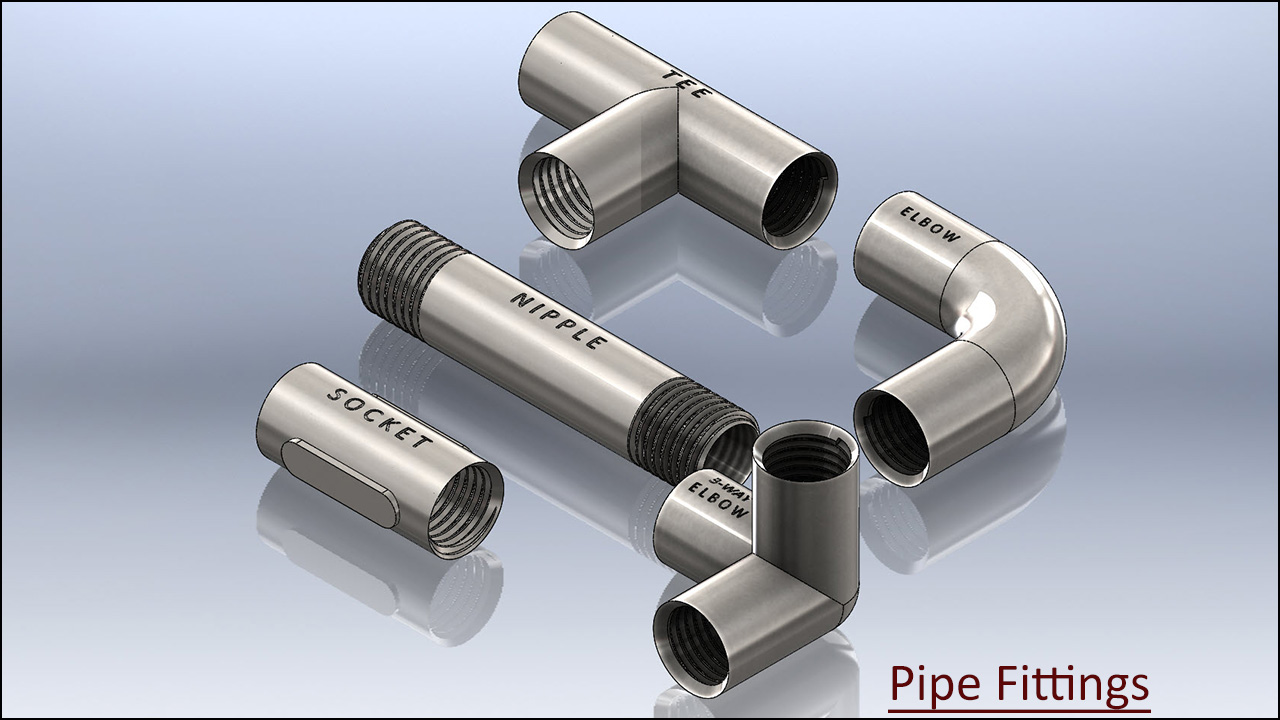
We have added the audio on this video so that you can understand it this video more easily. Inside this Solidworks tutorial, viewers can watch the full detailed process of creating pipe fitting components which are 3-D Parametric CAD Models. In this video, we will demonstrate how to modelling of Pipe Fittings names such as Nipple, Socket, Elbow, Three-Way Elbow and Tee components. In modelling of this video, we have used BSP Thread sketch profile in the cutting of realistic thread. We have used Helix/Spiral and Swept cut tool for creating the thread over these components.
.................................................................................... Visit the following link to watch the basic tutorial on SolidWorks by us https://www.youtube.com/playlist?list=PLb-IhKRMYSES3Zw3QHmQVqQ-rcFVzgYHy ......................................................................... To watch more detailed tutorials on the same software visit the following link https://www.youtube.com/playlist?list=PLKWX3xUP3pPo77gFCyy669sI76qJa5jKw ................................................................................... Hope all of you enjoyed the tutorial. If you find the video useful please like it and share it with your friends/colleagues and do not forget to subscribe us to get latest updates about our new uploads. http://www.youtube.com/user/nisheethsorjm?sub_confirmation=1 .................................................................................................... Dear Viewers if you like our work and wanted to support us, to keep continuing the good work, then become a patron of ours at ‘Patreon’ site. Patreon is a simple way for you to contribute to the creator’s work every month/ every time they release their new work and get rewards in return. Please visit the following link to know all about our work and what we are offering a reward to our patrons… https://www.patreon.com/nisheethsri ...................................................................................................................................
We have added the audio on this video so that you can understand it this video more easily. Dear Viewers, in this video we will show how to build the model 'Nozzle' in SolidWorks 2014 Software. Hope you will enjoy this tutorial. Please subscribe to our channel to get the latest updates and share this video their friends and colleagues.
.................................................................................... Visit the following link to watch the basic tutorial on SolidWorks by us https://www.youtube.com/playlist?list=PLb-IhKRMYSES3Zw3QHmQVqQ-rcFVzgYHy ......................................................................... To watch more detailed tutorials on the same software visit the following link https://www.youtube.com/playlist?list=PLKWX3xUP3pPo77gFCyy669sI76qJa5jKw ................................................................................... Hope all of you enjoyed the tutorial. If you find the video useful please like it and share it with your friends/colleagues and do not forget to subscribe us to get latest updates about our new uploads. http://www.youtube.com/user/nisheethsorjm?sub_confirmation=1 .................................................................................................... Dear Viewers if you like our work and wanted to support us, to keep continuing the good work, then become a patron of ours at ‘Patreon’ site. Patreon is a simple way for you to contribute to the creator’s work every month/ every time they release their new work and get rewards in return. Please visit the following link to know all about our work and what we are offering a reward to our patrons… https://www.patreon.com/nisheethsri ...................................................................................................................................
In this video tutorial we will create the model of a Chisel that will be created in part modelling environment of SolidWorks. The viewers will be able to watch the application of Extruded Boss/Base, Extruded Cut and Mirror Tool along with application of Planes.