Showing posts with label constraints. Show all posts

Friday, May 19, 2017

Dealing with ‘Not to Scale’ error while applying dimensions in Solid Edge

Dealing with ‘Not to Scale’ error while applying dimensions in Solid Edge

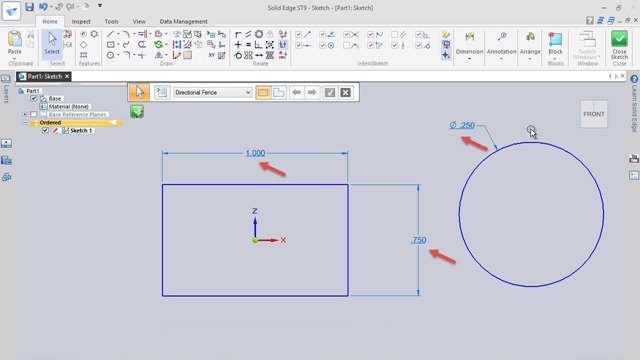
Some times while creating sketches in Solid Edge we face a strange problem. We are unable to modify the dimensions applied over the sketches. When we try to modify the software indicates that it is a Not to scale dimension and unchecking this option will return the dimension to its normal actual value. But unchecking that option also not solve the problem. At this point if we check the automatically defined constraints which are applied while creating sketch also do not exist.

This problem arises when we by mistake turn of Maintain Relationships command. This Command is available on Sketching tab →Relate group →Maintain Relationships.

Watch the video to understand it more.

 
Dealing with Not to Scale Problem while using... by 3DSolidModellingVideos

..........................................................................................

Visit the following link to watch more tutorial on Solid Edge by us

https://www.youtube.com/playlist?list=PLKWX3xUP3pPq5ijHdni6jXNX445Il3MWJ

..........................................................................................

Hope all of you enjoyed the tutorial. If you find the video useful please like it and share it with your friends/colleagues and do not forget to follow/subscribe (over YouTube and Daily Motion) us to get latest updates about our new uploads.

http://www.youtube.com/user/nisheethsorjm?sub_confirmation=1

..........................................................................................

Sunday, October 20, 2013

Assembly Modeling in Pro E Wildfire (Hinge)


Hinge (You Tube Icon This video tutorial displays the modelling of a Hinge in Pro E Wildfire. Hinge is the assembly of three parts so viewers will see the application of many part and assembly modelling tools of Pro E Wildfire 5.0 like Extrude, Hole, Mirror, Chamfer /Adding and creating new parts in assembly, applying constraints parts etc.


download-Link 


Click the following link to get the model file: -http://bit.ly/2mC9d7f


Related Newer  Post:---

Hinge || Creo Parametric Tutorial


Sunday, June 16, 2013

Creating Unified and American screw internal thread profile (Autodesk Inventor 2013)

Unified and American screw internal thread

Serial No. 7

Creating Unified and American screw internal thread profile (Autodesk Inventor 2013)

In this video, we will show you how to create a thread profile for the Unified and American Screw thread (internal) through Autodesk Inventor. With simple parameters and constraints we can create the sketch profile for this thread quite easily.
We will not apply detailed formula derived values in the beginning of sketch. But the final sketch will prove the equations values itself.


download-Link 


Click the following link to get the model file:- http://bit.ly/2mXUenI